Before we begin with the TLS proxy section, let's establish some context around the terms HTTPS, SSL, and TLS that are often mixed together:
- The term SSL stands for "Secure Sockets Layer." It is a network protocol that provides cryptographic security to data while in transit. SSL ver 1.0 was never released. Versions 2.0 and 3.0 were used for internet security in the late 90s and early 2000s. All versions of the SSL protocol have long been deprecated and not used.
- The term TLS stands for "Transport Layer Security." TLS is simply a more secure version of SSL. Due to security flaws in SSL versions 2.0 and 3.0, SSL 3.1 was created and renamed to TLS 1.0. Since then, TLS versions 1.1, 1.2, and the latest 1.3 have been created and used for Internet security. However, people still refer to TLS as SSL to this day.
- HTTPS is just the HTTP protocol but with TLS encryption on top. However, the terms HTTPS, SSL, and TLS are often used interchangeably.
So, in summary - SSL is the old name, TLS is the modern protocol, and HTTPS is the web application that runs on top of TLS.
Why do we need an HTTPS/TLS proxy?
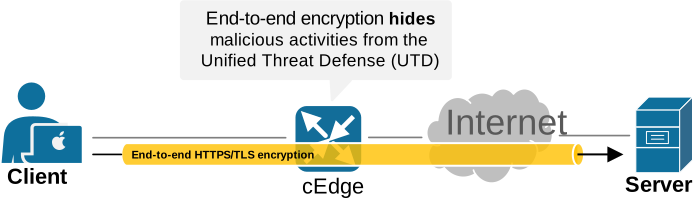
Nowadays, many organizations consume business-critical apps as-a-service over the Internet. As a result, most user traffic is HTTPS/TLS encrypted from an end client all the way to a server, as shown in the diagram below. This end-to-end encryption prevents security devices from enforcing the organization's policy and may lead to hidden threats and malicious activities.
Cisco SD-WAN's TLS/SSL proxy feature allows us to set up an edge router as a transparent HTTPS proxy. The router performs TLS encryption and decryption as a man-in-the-middle (MiTM) between the client and the server, as shown in the following diagram. It acts as the client from the server’s perspective and as the server from the client’s perspective. This allows the router to send the application traffic unencrypted to the Unified Threat Defense (UTD) for inspection and enforcement of the organization's policy (FW, IPS, URLF, AMP).
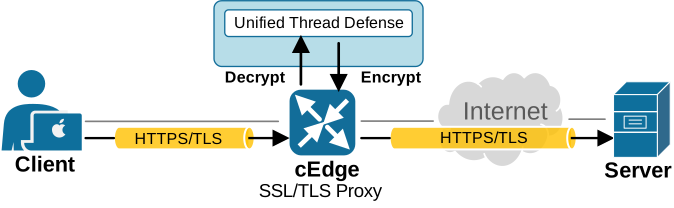
The term "transparent" proxy means that user traffic is redirected to the proxy at the network/transport layers without any explicit configuration on clients’ devices.
Also notice that in Cisco SD-WAN documents, you will still see the phrase SSL/TLS proxy, but Cisco also notes that TLS is the successor to SSL and uses the term SSL to refer to TLS in this context because many engineers still use SSL as a common name for encrypted.
How does TLS proxy change the traffic flow?
When a Cisco Catalyst SD-WAN edge router is configured as a TLS proxy, the traffic path changes. Instead of letting the client and server build one direct TLS session, the edge device can step into the middle and build two separate sessions: one toward the client and one toward the server. In Cisco Catalyst SD-WAN, the TLS proxy is tied to both Unified Threat Defense (UTD) and AppQoE. Its purpose is to expose selected encrypted flows to inspection or optimization and then send them on after the required processing is complete.
If a TLS proxy policy is configured for this traffic flow, the ClientHello message is sent to the Unified Threat Defense (UTD). Based on the configured proxy action, the router takes the following action:
- Decrypt: When the UTD verdict is “Decrypt”, the router does not simply relay the original handshake. It acts as a man-in-the-middle. Toward the server, it behaves like a TLS client and checks the server certificate according to policy. Toward the user, it presents a proxy certificate that is generated dynamically and signed by the configured certificate authority. This means the original end-to-end TLS session is split into two separate TLS sessions, with the edge router sitting between them. Then it performs the following actions:
- TCP optimization.
- Decrypts the traffic and sends it for inspection to UTD.
- Re-encrypts the traffic and forwards it along.
- Do-not-decrypt: If the UTD verdict is "Do-not-decrypt," no other feature can decrypt the traffic (such as AppQoE). The router drops the connection, allowing the client and server to communicate directly. The Client Hello bypasses the TLS proxy, and the session forms and stays encrypted.
- Pass-through: If the UTD verdict is "Pass-Through," UTD doesn’t initiate traffic decryption. However, other features (such as AppQoE) can still initiate decryption through the TCP proxy.
The following diagram illustrates the process with a simple example. A client tries to open a web page by using HTTPS. During the TLS handshake, the router intercepts the session and forwards the ClientHello to UTD to determine whether the connection should be decrypted. Based on the UTD policy, the TLS proxy either decrypts the traffic for inspection or allows it to pass through unchanged, as shown in the diagram below.
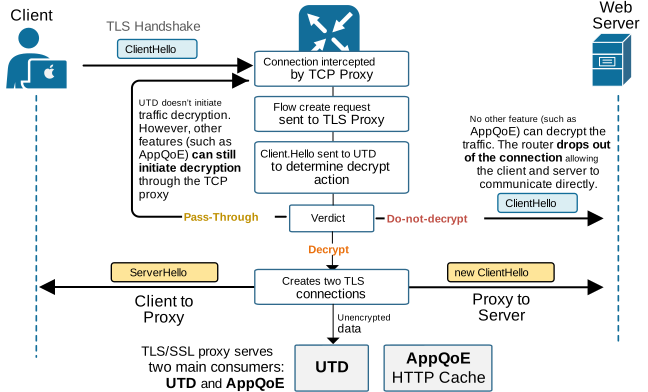
When the configured action is "decrypt," the TLS proxy sends a ClientHello to the server and inspects the resulting ServerHello and Server Certificate. It answers the client with an Alternative ServerHello and issues a proxy SSL certificate. Depending on the configuration and the supported cryptographic ciphers, the proxy can renegotiate different encryption sessions with both ends.
The following diagram shows the TLS handshake process when the TLS/SSL proxy imposes itself in the middle. Notice that the client must trust the TLS proxy by installing the root CA certificate in its trust store (or by clicking through the certificate error)
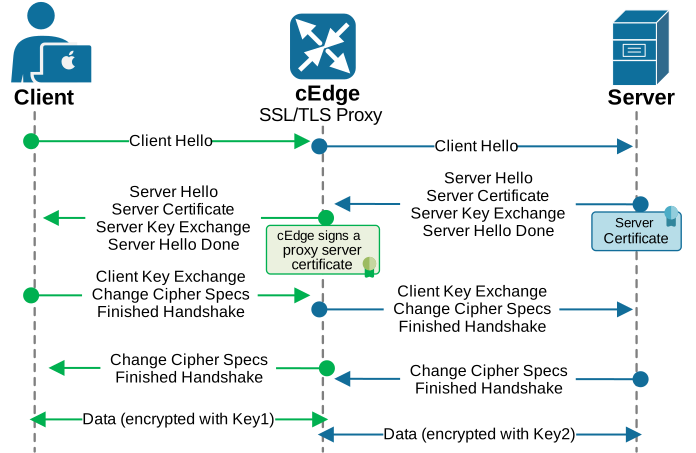
You can see that the proxy issues and signs proxy certificates on the fly. Let’s now shift the focus to that process and see what configuration options we have when it comes to Certificate Authority.
TLS Proxy and Certificate Authority (CA)
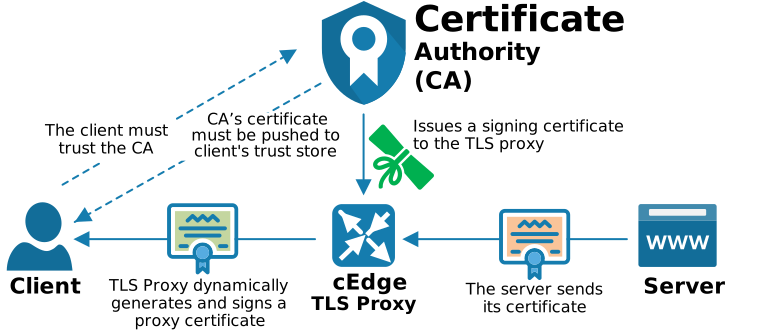
The Certificate Authority (CA) is a key part of the TLS/SSL proxy design. The proxy cannot create and sign substitute certificates on its own, because clients must see a certificate that chains back to a trusted authority (as explained at the beginning of the security chapter). For that reason, a WAN Edge router that will act as a TLS proxy must first receive a signing certificate from a trusted CA. Basically, the router must become an Intermediate CA, as explained earlier.
After that, the router can securely store the intermediate CA certificate and use it to generate and sign proxy certificates on the fly for the TLS sessions it intercepts. This process allows the router to temporarily act on behalf of the original server during the encrypted exchange. As a result, the client sees a certificate it can trust, while the router is able to decrypt the traffic, inspect it against security policies, and then re-encrypt it before sending it toward the real destination server.
The following diagram shows this relationship between the TLS proxy, the CA, and the client.
There are four CA configuration options to choose from in the SD-WAN Manager (vManage) Configuration > Certificates > Certificate Authority depending on the organization's PKI infrastructure:
- Enterprise CA
- Enterprise CA with SCEP Enabled
- SD-WAN Manager as CA
- SD-WAN Manager as Intermediate CA
Let's quickly list the pros and cons of each supported CA option.
Enterprise CA
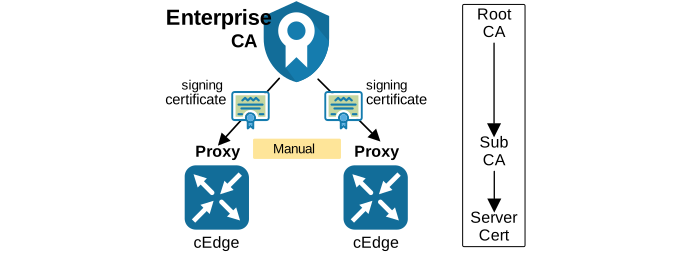
If the organization already has a mature internal PKI, the Enterprise CA model is often the most natural fit. In this design, the TLS proxy uses the same trust hierarchy that the rest of the enterprise already uses. That means client devices usually do not need any trust-store changes, because they already trust the enterprise root. It also keeps certificate ownership, revocation, and lifecycle control under the same CA team and the same operational process. The following diagram illustrates this model.
- Pros:
- All organization certificates (SD-WAN and non-SD-WAN related) are managed through the same CA infrastructure, most likely by the same team.
- The same CA provides validity, expiry, and revocation of certificates.
- The trust store doesn't need to be updated on clients (assuming the enterprise CA is already trusted).
- Cons:
- If the Enterprise CA doesn't support SCEP (Simple Certificate Enrollment Protocol), certificates are managed manually. This includes generating a CSR for each router acting as a TLS proxy, signing the CSR by the CA, and uploading the signed certificate to the router via vManage.
- Reissuing expired certificates is also manual.
- The network team has limited visibility into certificates via vManage.
- Large blast radius if the enterprise CA gets compromised.
Enterprise CA with SCEP
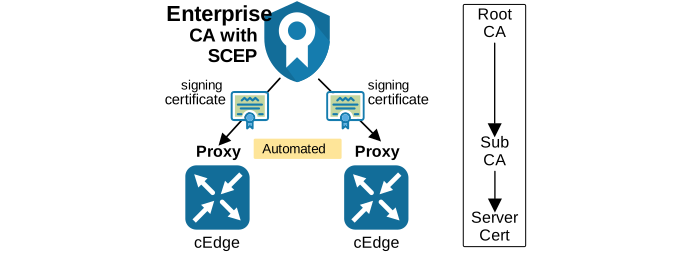
This option keeps the same trust architecture but improves the operational model. The enterprise CA still remains the source of trust, but SCEP automates certificate enrollment. As a result, the WAN Edge can obtain its certificate with much less manual work. This is a strong choice for organizations that already have an internal PKI. Figure 12.43 represents this approach.
- Pros:
- All benefits of the Enterprise CA option.
- The same CA provides validity, expiry, and revocation of certificates.
- The trust store doesn't need to be updated on clients. (assuming the enterprise CA is already trusted)
- The deployment of certificates on the TLS Proxy routers can be automated.
- All benefits of the Enterprise CA option.
- Cons:
- The network team has limited visibility into certificates via vManage.
- Large blast radius if the enterprise CA gets compromised.
SD-WAN Manager as CA
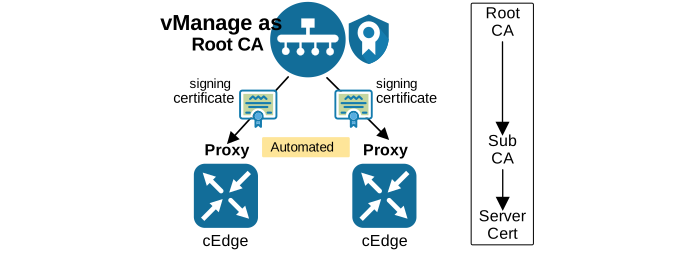
If the organization does not have its own PKI, the SD-WAN Manager can act as the root CA. In this design, vManage issues subordinate CA certificates to the proxy routers and manages them centrally. This greatly simplifies the operational model. Certificate deployment is automated, renewal is easier, and the status of proxy certificates can be monitored from the SD-WAN platform itself. The following diagram shows this model.
- Pros:
- Automated certificate deployment to routers acting as a proxy.
- Automated certificate reissuing before they expire.
- Extensive visibility of certificates' validity, expiry, etc., via Cisco vManage.
- Cons:
- vManage’s root certificate must be pushed to the clients' trust store. Installing the root cert to clients could be automated using a mechanism such as Microsoft Group Policy object (GPO).
- Some browsers have their own trust stores. The OS trust store should normally override the browser one, but testing shows it is not always the case.
SD-WAN Manager as Intermediate CA
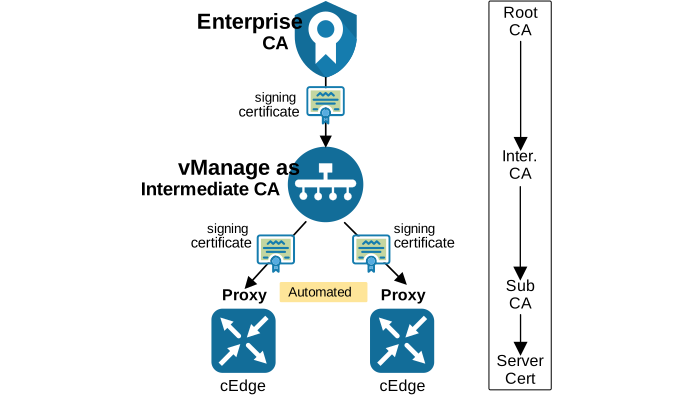
For many large enterprises, the most elegant model is to use Cisco SD-WAN Manager as an Intermediate CA. In this design, the enterprise CA remains the root of trust, while SD-WAN Manager becomes the intermediate CA that issues and manages subordinate CA certificates for the proxy routers.
This option combines the strengths of both worlds. The enterprise keeps its existing PKI trust model, while the SD-WAN team gains automation and better visibility. The following diagram shows this design.
- Pros:
- Automated certificate deployment to proxy devices.
- Automated certificate reissuing before they expire.
- Extensive visibility of certificates' validity, expiry, etc., via Cisco vManage.
- The Cisco vManage certificate doesn't need to be pushed to the client trust store. (assuming the Enterprise CA is already trusted by clients)
- Cons:
- The deployment could become complex if there are multiple vMange controllers in a cluster.
- The intermediate cert must be sent along with the chain-of-trust.
This model is often the best balance, but it is also more complex. SD-WAN Manager must generate a CSR, the enterprise CA must sign it, and the certificate chain must be handled correctly. Once the intermediate CA is in place, SD-WAN Manager can automatically issue subordinate proxy certificates when the TLS decryption policy is attached to the device. This makes the long-term operation much easier than the fully manual Enterprise CA model.
TLS Proxy Design Consideration
Some additional design considerations must be made before an organization decides to implement a TLS Proxy.
- Since the proxy device interposes itself in the middle of HTTPS connections, flow symmetry is required in dual-homed branches. The same session must stay on the same device, because that device is the one maintaining the proxy state. This is typically recommended for all security features and for application recognition with NBAR.
- Additionally, on dual-internet routers, the flows must be pinned to the same Internet link to ensure that the SSL client is NATed to the same source IP address.
- Clients and the proxy must have their time in sync. Notice that even a few milliseconds of time difference may cause an EFT issue (cert error).
- As you might guess, IPv6 is not supported at the time of writing (which is the case with most security features). However, most capabilities slowly but surely add IPv6 support, so it will definitely be supported sometime in the future.
- TLS session resumption, renegotiation, and client certificate authentication are not supported either.
Lastly, remember that a TLS/SSL proxy design is never only about security inspection. Yes, we use it to decrypt HTTPS traffic and send it to other security features such as IPS, AMP, and URLF for inspection. But at the end of the day, the TLS/SSL Proxy is also part of the organization’s trust distribution and the certificate lifecycle.