Now, let’s imagine you want to deploy Cisco Catalyst SD-WAN in your organization from scratch. A ground-up greenfield deployment. It is not very common, because most organizations already have a WAN network in place. But anyway, just to walk through the high-level steps of how the solution is deployed and how it works.
You have been tasked with deploying SD-WAN across the following simple network with four locations. Each location has one WAN router that connects to two WAN transports – one Internet link and one MPLS link, as shown below.
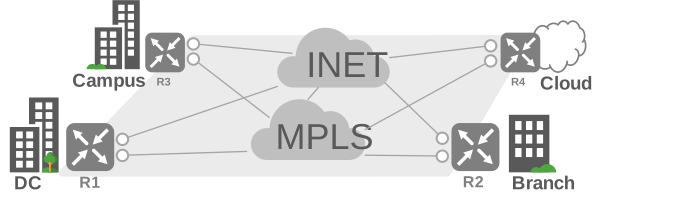
At this point, the routers and circuits have not yet been purchased, and nothing SD-WAN-related has been prepared. No certificates, licenses, or device configurations are prepared. In other words, this is a deployment from the ground up.
To keep the example simple and focused on the high level, we will not go deep into specific business requirements and details. Let’s simply say the goal is to deploy a Cisco SD-WAN fabric that provides secure connectivity between all sites by making a full mesh of IPsec tunnels.
So, your boss has given you the task, “Hey Joe, deploy Cisco Catalyst SD-WAN at these four sites”.
Now what? Where do you start? Do you buy the routers first? Do you buy the controllers first? What are the first steps, and in what order should you take them?
To build a fully functional SD-WAN overlay, you usually follow the simplified sequence that is shown in the following diagram.
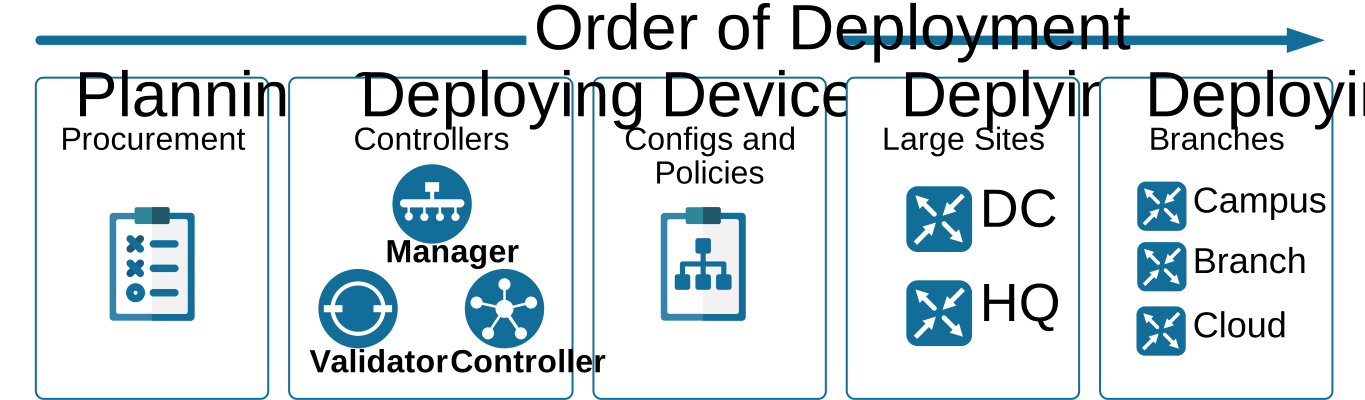
You start with planning and procurement. In this phase, you choose the edge platforms and software versions that most accurately satisfy your requirements and decide what topology of IPsec tunnel you will need. You also make sure the underlay is ready, which includes purchasing circuits, basic IP reachability, and NAT rules required for the edge routers to reach the SD-WAN controllers.
Next, you deploy the controllers. You bring up the SD-WAN Manager (vManage), the SD-WAN Validator (vBond), and the SD-WAN Controller (vSmart). You install certificates, set the organization parameters, and verify that the controllers can authenticate and communicate with each other. At this stage, you also determine how many controllers of each type you need, depending on the network scale (based on the number of routers, sites, transports, features, etc.).
Once controllers are deployed, you prepare the device configurations. You create configuration groups (or device templates in older versions) and define variables so you can reuse the same configuration templates across many sites.
After that, you build centralized policies. These policies are configured in vManage and then distributed to the vSmart controllers, which enforce the overlay topology (hub and spoke, full mesh, etc.) and the traffic behavior in the fabric.
Finally, you deploy the edge routers. In most designs, you start by deploying the large sites first, such as the headquarters and data centers, because they usually provide shared services and act as hubs. This can be done with a manual bootstrap configuration through the console, using a USB stick, or through automated onboarding using the Zero-Touch Provisioning service (ZTP).
After routers authenticate with the SD-WAN controllers, the SD-WAN manager (vManage) pushes the full configuration based on the device identity, and you verify that IPsec tunnels come up. Traffic is starting to flow, and the network is now operational.
This is the deployment process at a very high level. Now let’s zoom in on each step in a bit more detail, so you can see how the solution works and have proper context for the next chapters.