In the previous lessons in this section, we discussed how Configuration Groups define router settings and how Policy Groups define traffic behavior. We now need to answer another set of questions related to the overlay topology of IPsec tunnels:
- What should be the topology of IPsec tunnels- hub-and-spoke, custom mesh, or full mesh?
- How should sites connect to one another in every VPN?
- What happens if the primary data center becomes unavailable?
These are design questions that affect the entire SD-WAN network. In this chapter, we examine how the new UX2.0 Topology Group workflow helps us turn those choices into an overlay design, as shown in the table below.
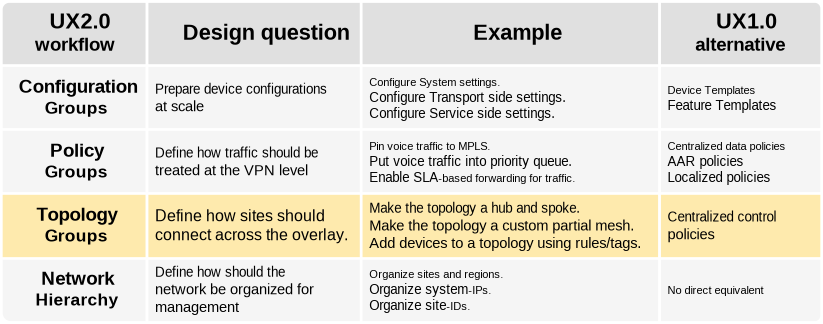
As always, let’s first provide some context and start with the most fundamental question that will help us understand the concept before moving into the practice portion.
Why do we need Topology Group (UX2.0)?
In UX1.0, to change the default full-mesh topology of IPsec tunnels, we need a Centralized Control Policy. At a high level, the process involves three steps, as shown in the diagram below.
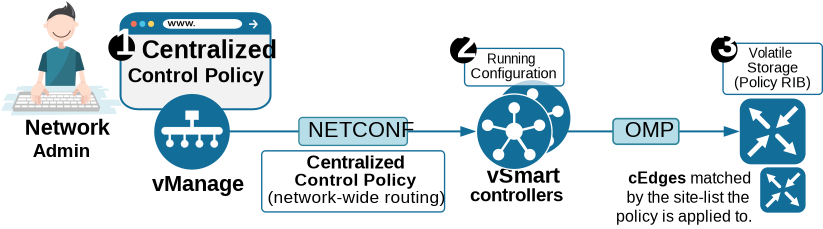
- Step 1. First, we create site lists and VPN lists under Groups of Interest. We define ranges of site IDs and group them into lists. For example, we create a site list called ALL_BRANCHES that includes IDs 1-300. Then we create policy definitions that accept/reject tlocs and vroutes to define our desired control-plane topology. Lastly, we tell vManage to apply the policy to the ALL_BRANCHES site list in the outbound direction.
- Step 2. When we activate the policy, vManage configures it on all vSmart controllers via NETCONF transactions. The policy becomes a part of the controllers’ running configuration. You can check it on vSmart using the show run policy command.
- Step 3. The vSmart controllers enforce the rules via the OMP updates they send to the sites in the ALL_BRANCHES site-list.
If you have any prior experience with centralized policies or you come from Volume 1 of this book, the process should be very straightforward to you.
This model worked well for years. However, once more and more large-scale customers deployed Catalyst SD-WAN, some feedback started coming in. The most common complaint was that, at scale, the centralized policy becomes harder to change and maintain. But why?
To understand why, let’s go through a simple example. An organization has 300 branches (site-ids 1-300) and a data center called DC-EAST. After a while, the organization builds another data center, DC-WEST, and they want some branches (site-ids 200-300) to use the west data center as the primary hub and keep the east data center as a backup hub. How much policy do we have to touch to achieve this?
Let’s say we add site IDs 200-300 to a new list WEST_BRANCHES and bind a new outbound control policy to that list. However, sites 200-300 already belong to the ALL_BRANCHES site-list, which has an outbound policy of its own. A site can have one control policy in each direction. A second outbound control policy for the same site creates an overlap that stops the policy from activating.
Removing 200-300 from ALL_BRANCHES looks like a quick fix. Before we do that, we need to see what else uses that list. If ALL_BRANCHES also defines which sites get AAR policy, the branches lose the application-aware routing features. The struggle continues. What if there is a centralized data policy also applied to the ALL_BRANCHES list? You need to reconfigure that as well. A shared VPN list creates the same headache. If we add or remove a VPN ID, which other policies and rules will that change affect?
This example is for a big change in the network, but the same thing happens even if we want to change only one site. For example, to move one site ID from the east to the west group of branches. Also, keep in mind that site IDs in real networks are not 1, 2, 3, etc. They are usually six- or seven-digit numbers like 2140011, 1002099, etc.
The main inefficiency of centralized policies in UX1.0 is the manual work it takes to maintain Site and VPN lists. Network administrators are responsible for grouping IDs into lists and maintaining these lists. As the network grows, every small change requires network administrators to trace IDs through many lists and check where each list is used.
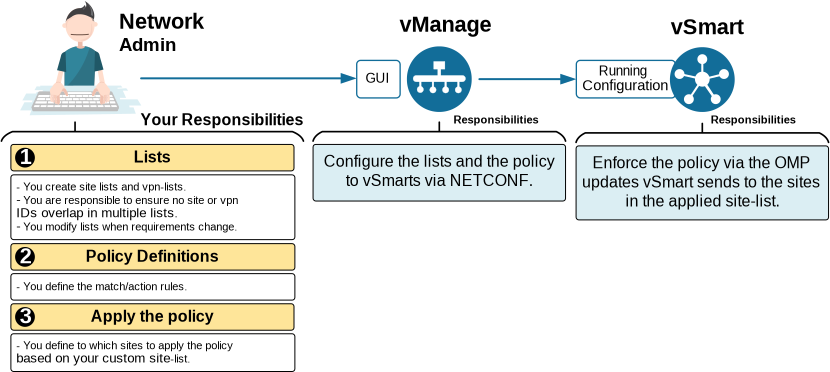
The Catalyst SD-WAN team quickly realized that people are not good at maintaining and changing ranges of IDs – but computers are. People are good at working with human-defined names and tags. And that is what Topology Groups improve. Creating and maintaining lists is now a responsibility of the vManage controller. Network administrators can now fully focus on creating the policy definitions, as shown in the following diagram.
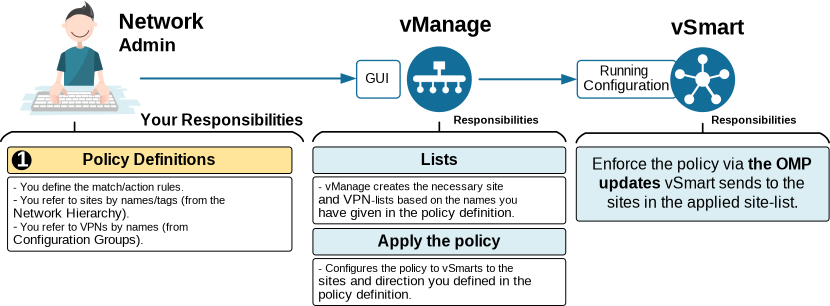
When creating control policies using Topology groups, you select sites using their human-defined names, not site IDs. vManage is now responsible for creating the necessary lists at the end. It gets the site IDs from the Network Hierarchy. It then builds the lists that vSmart uses to apply the control policy.
It is the same with the VPN IDs in the vpn-lists. The controller gets the VPN IDs from the Service Profiles in the routers’ Configuration Groups. It then builds the lists that vSmart uses to apply the control policy. This automated process also ensures that the same site-lists or VPN-lists are not used for control, data, and AAR policies at the same time, making it easier to change one policy without affecting other policy types.
What is a Topology Group?
The topology group is a logical container for the control policies that vManage pushes to vSmart once you activate the topology, as shown in the diagram below.
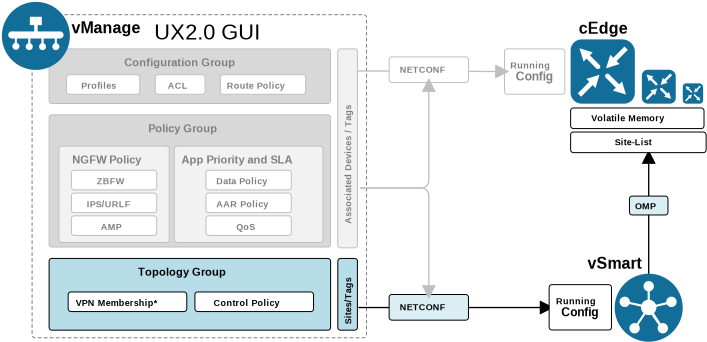
Now, there are a few important points you need to understand:
- First, the topology group is a construct on the SD-WAN Manager (vManage). It is a GUI construct. It is a web interface for creating, configuring, and storing centralized control policies.
- A Topology Group holds multiple control policy definitions for different sites and VPNs.
- While you work on a topology group on vManage, nothing actually happens on the vSmart controllers. You work in vManage's web interface. Only when you activate the Topology Group does vManage build the control policies from those definitions and push them to the vSmart controllers via NETCONF transactions, as shown in the diagram above.
- Only one Topology Group can be active on vManage at a time, so activating a new topology group deactivates the previous one
Let's zoom into the last fact - only one group can be active at a time. Some engineers may not understand why this is the case at first. That's because each vSmart controller has a single top-level policy section in its running configuration (similarly, a router has only a single router bgp top-level section, and all neighbors and address families are configured under that section). That section can hold several named control-policy entries applied to different site-lists and directions, as shown in the diagram below.
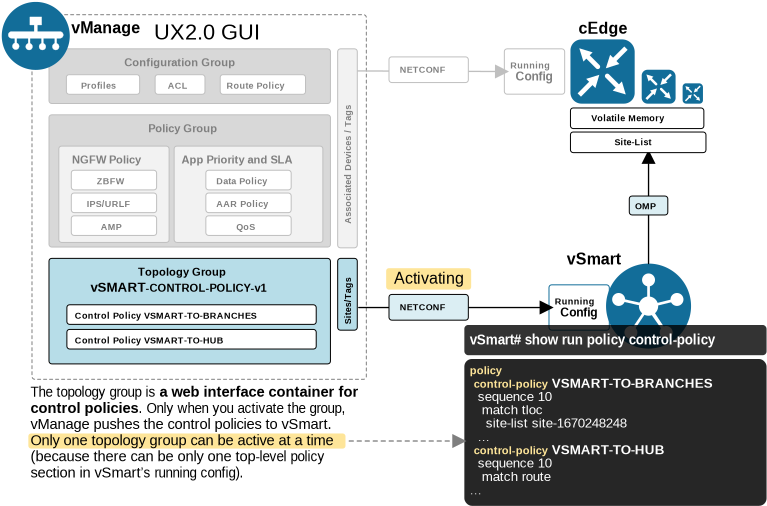
Notice the name of the topology group: vSMART-CONTROL-POLICY-v1. Why put vSMART in the name, you may ask? For me personally, this is very important because many engineers don’t automatically think of the topology group as something that will be configured on the vSmart controllers. The name tells you: The topology group is a container of the control policies that vManage will push to vSmart once you activate it. It immediately gives you useful context
Remember that only one topology group can be active at a time. And this leads us to the second part of the name – the suffix v1. It marks this as the first version of the group. But this raises another question: why can we configure multiple topology groups if only one can be active at a time?
And the answer is – to copy/paste the active topology group into a new one with a different name – for example, vSMART-CONTROL-POLICY-v2. Then make the necessary changes and activate it, which automatically deactivates v1, as shown in the diagram below. If something goes wrong, reactivate the old version.
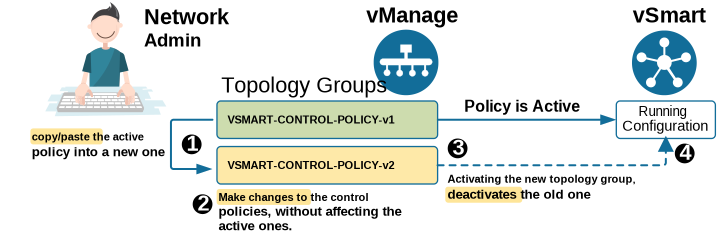
And this is how we work with Topology Groups in the SD-WAN Manager. It is a scalable, flexible web interface for creating, applying, and storing centralized control policies.
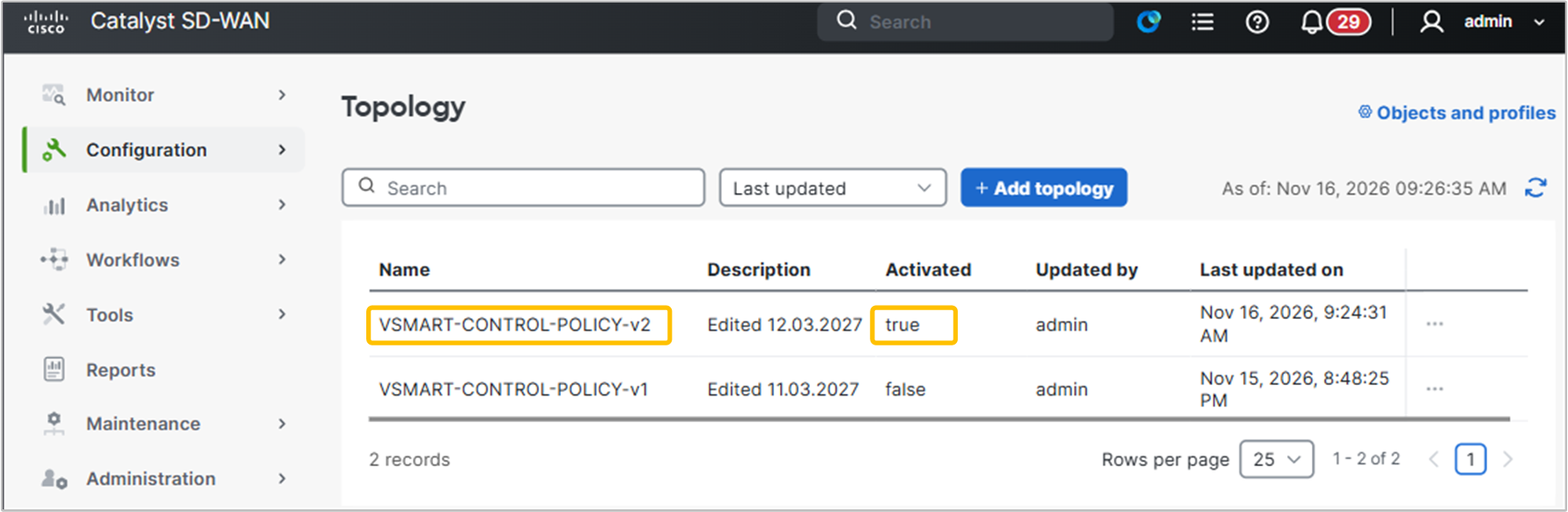
The screenshot above shows an example with two groups configured on the SD-WAN Manager. Notice which one is activated. Also notice how straightforward it is to roll back to the previous one if there's a problem. You simply activate the previous one, which you know works well, and vManage automatically deactivates v2.
KEY TO UNDERSTAND: There is no such thing as a Topology Group on vSmart. Topology Group is the web interface container for creating and storing centralized control policy definitions on vManage for different sites and directions. Once you activate a topology group on vManage, it builds the control policies and configures them on the vSmart controllers.
In the next couple of lessons, we will see a few different approaches to change the overlay topology of IPsec tunnels to hub-and-spoke and custom mesh using Topology Groups. For now, it is important to understand what UX2.0 improves compared to the legacy approach to changing the topology with centralized policies and to have the proper fundamentals to build upon.
Key Takeaways
- Topology Group is the SD-WAN Manager web interface where you define centralized control policies that you want to push to the vSmart controllers. One topology group can hold hub-and-spoke, mesh, or custom designs for different sites and VPNs.
- In UX 1.0 (Centralized Policy), it is your responsibility to create and maintain the site-lists and VPN-lists that vManage needs to build the policies.
- In UX 2.0 (Topology Group), you select the sites and VPNs for each design, and vManage builds the lists it needs.
- vManage builds the control policies. vSmart enforces them via OMP. When you deploy the group, vManage sends the policies to the vSmart controllers.
- Only one Topology Group can be active at a time. You can prepare v2 while v1 is active, preview the CLI changes, and deploy v2 when ready. If you need to go back, activate and deploy v1 again.