In this lesson, we begin our discussion of Catalyst SD-WAN's new management model, called UX 2.0 (User Experience 2.0). To understand it, let's first provide some context.
UI vs UX
We will discuss UX1.0 vs. UX2.0. But what is UX in the first place?
- The User Interface (UI) is what you see and use on the screen when you open a webpage in the browser. For example, you open the vManage GUI. It includes the layout, menus, buttons, images, and fonts. Basically, the UI defines how the web interface looks.
- The User Experience (UX) is the UI plus the experience layer on top. It defines how the web interface feels. You have all menus and buttons on the webpage, but is it clear where to go to complete a task? Which menus and buttons do you need to go through? Are the workflows intuitive or confusing?
In the context of the SD-WAN Manager GUI, UX is about how easy and intuitive it is to get a task done. Say you want to change the overlay topology by applying a control policy to vSmart. Is it clear which menu to open and which policy objects to create? Can you find the settings you need and tell how to deploy the policy?
Cisco SD-WAN UX1.0
In that context, we refer to the old vManage web interface and the old configuration model as UX1.0. It uses Device and Feature Templates to configure devices and Centralized and Localized Policies web interfaces to create and apply traffic and topology policies to the SD-WAN fabric. The following diagram shows how those concepts fit together.
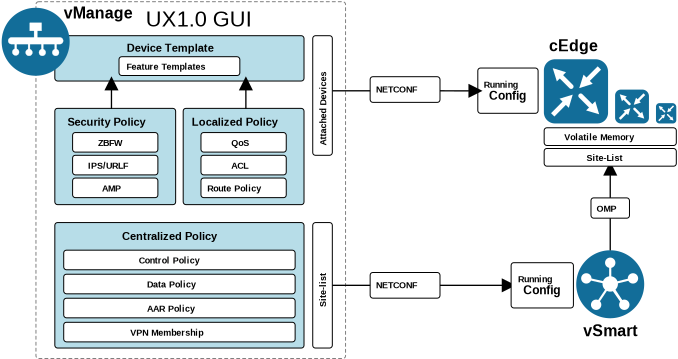
Notice that we call UX1.0 the old vManage web interface for configuring devices and policies, not the policies themselves. For example, the old Centralized Policy page that we used to configure centralized control and data policies. This page is no longer used, and we now use the Policy and Topology Groups web pages (UX2.0) to configure the same policies. We still use centralized control and data policies, though. However, the way we configure and apply them via the vManage GUI has changed.
UX1.0 has been around for many years, and many customers still use it today. However, over time, it became clear that UX1.0 has many inefficiencies, especially in large-scale environments, that make operating the SD-WAN network very complex and messy. That's why in release 20.12, Cisco introduced a new management model called UX2.0.
Why do we need UX2.0?
The problem with UX1.0 was never the capability. It is a powerful framework, well structured around localized and centralized policies and device templates. The problem is that it focuses more on workflow than on business requirements. Hence, what happens in practice is that one business requirement spans multiple policy pages and requires many steps to be met, as shown in the diagram below. It becomes especially obvious with traffic policies, AAR, and QoS in large-scale networks; it gets very complicated, very fast.
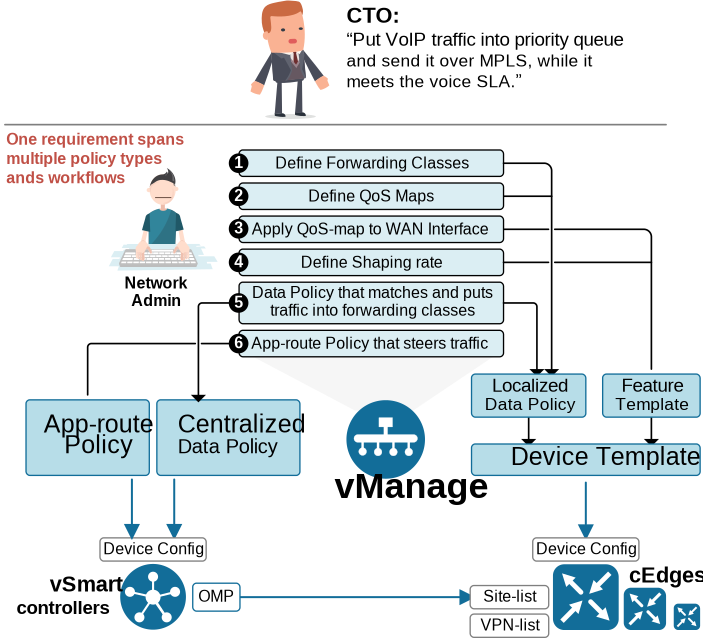
And then comes the deployment problem. In UX1.0, after every change, you deploy the device template and data policies to all target sites/devices. There is no option to deploy selectively to one test site and, only if it succeeds, roll out the change to all sites sequentially. This becomes a bigger problem when you have a business requirement that says, "test the policy on one site only and only if everything works, deploy to all sites."
Let's go through another example. Imagine you have a large-scale SD-WAN network with 1000 branches. Centralized data and AAR policies are in place. A new video conference app is about to go live. First, the CTO wants all routers to recognize the app and put its traffic in the priority queue. Then he wants the network to pick a path that meets the SLA for voice and video. The CTO wants you to test this at one branch before you roll it out to the other 999 branches. And this requirement touches all pain points of UX1.0.
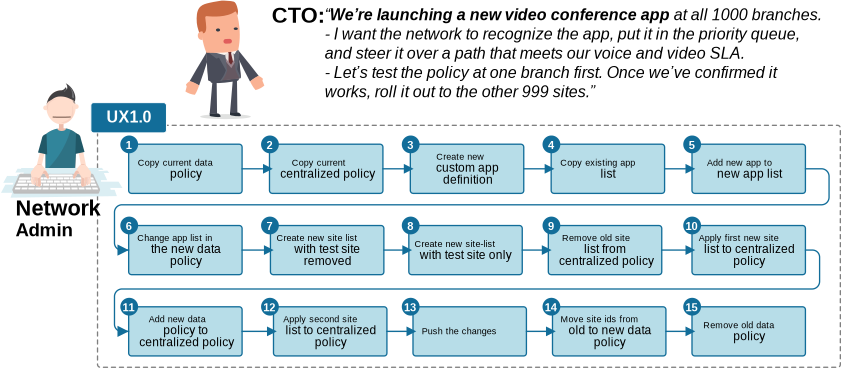
These two examples show the inefficiencies of UX1.0 — it focuses too much on the workflow and not on the business intent.
What is UX2.0?
Once Catalyst SD-WAN became widespread across organizations of any size, Cisco began collecting customer feedback. Two concerns came up most often.
- The SD-WAN Manager web interface was not intuitive to navigate.
- The steps to configure devices or change policies quickly get very complicated.
In response to the feedback, Cisco began restructuring the SD-WAN Manager GUI and the management model entirely, calling it the User Experience 2.0 (UX2.0), as shown in the diagram below.
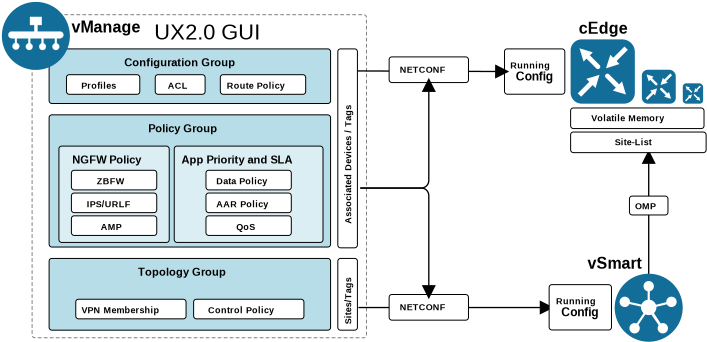
Notice that we have the same policies, but they are now organized into different pages (containers) and are configured and applied using different workflows. However, the SD-WAN solution still works the same way in the context of the control plane, and the data plane is still the same.
The reorganization of the SD-WAN Manager GUI and the management model makes configuring devices and applying policies much more efficient. Before going into details, let's quickly see how the same business requirement is met using the new UX2.0.
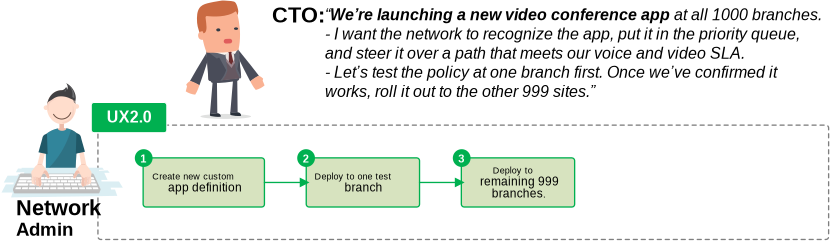
If you compare it to Figure 3 above, you can see how many fewer steps it takes to complete the same task.
How does UX2.0 work?
Keep in mind that in this section of the course, we are going to discuss each of the new configuration and policy models. However, in this lesson, we will just quickly introduce each one so that you can get a full picture of what UX2.0 has changed.
Configuration Groups
In UX1.0, you configure devices using Device and Feature Templates. Based on years of feedback, the following three inefficiencies became obvious:
- Device and Feature templates are created per device model. This leads to a huge template sprawl because you create separate templates for different hardware models even if they share the same role and function in the network.
- Once you make a change to a template, you must immediately push the change to all devices attached to that template. This creates a big blast radius. Over time, people become afraid to push changes to all sites at once and start copy/pasting templates and attaching a small number of devices — deepening the template sprawl problem.
- You attach devices to templates manually. In large-scale deployments with hundreds of sites, this becomes a bottleneck.
- Smart defaults - the common settings for each feature are pre-populated based on best practices. You decide what to modify further and what to leave at the default.
In UX2.0, you configure devices using configuration groups. A configuration group is a logical grouping of devices that share a common role or function in the network.
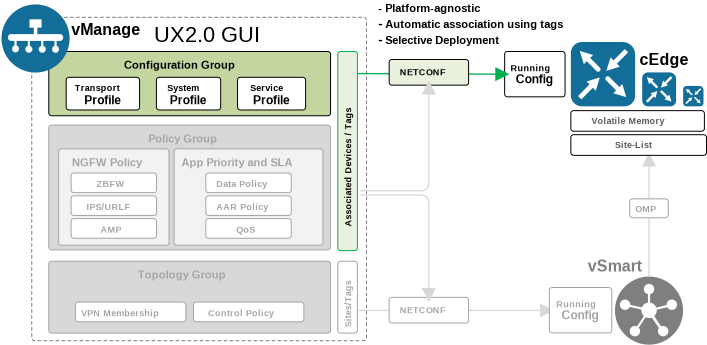
Config groups introduce several major improvements over Device and Feature Templates:
- They are platform-agnostic. You can associate different hardware models to the same group.
- When you make a change, you can deploy the configuration group to one device or a selected number of devices. This is the big deal.
- You can associate routers to the config group using automated rules using tags.
Policy Groups
Think back to the video conference app example we saw in the beginning. In UX1.0, a centralized data policy assigned its traffic to a forwarding class. A QoS policy mapped that class to a queue. An AAR policy picked a path based on the SLA. To test at one branch, you used a custom-made site-list that you later need to replace.
A Policy Group holds traffic, QoS, and security policies for a group of routers in one place. It lets you match the video conference app, put it in a priority queue, and set the rules for path selection in one workflow, as shown in the diagram below.
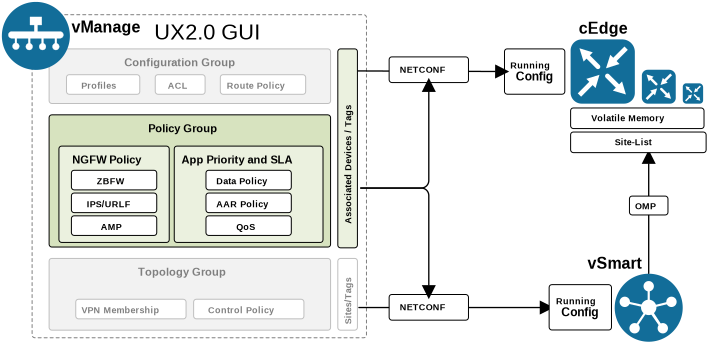
Policy groups are probably the most significant UX2.0 improvement, and we will discuss them in detail in the next lesson of this section.
Network Hierarchy
In the UX1.0 policy workflow, you use site lists to set which site IDs a policy covers. Say you work with site ID 507 in a list. Which branch is it, and where does it fit in the WAN policy?
The Network Hierarchy gives each site a human-defined name, tag, and a place in a tree. You can group sites by location or by role. You can then pick that named site, or the named group of sites, when you apply a policy.
Tags and Rules
A tag is a label you give a router. They bring human-defined abstraction to the site and VPN lists across the fabric. You can group devices based on tags and then apply configuration or policy groups automatically.
Topology Groups
In UX1.0, you build the overlay topology in the Centralized Policy workflow. You set up site and VPN lists and link them to the control rules. In UX2.0, a Topology Group holds the control policies that shape how sites reach each other.
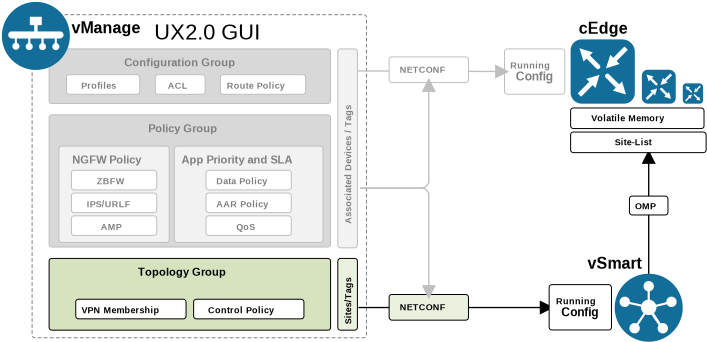
The main improvement compared to the old Policy workflow is that you can apply the control policy to site nodes that you configure under the Network Hierarchy. You can also apply the policy to sites selected by rules and tags. This is a huge optimization, as you will see in the lessons on Topology.
Let's stop here and not go into the rabbit hole of each UX2.0 improvement. This lesson is simply a high-level overview that will serve as a context when we take a closer look at each improvement in its own lesson.