Configuration Groups (CGs) are the second-generation configuration model for Catalyst SD-WAN. Basically, Cisco collected extensive customer feedback, identified the most common inefficiencies in Device Templates and Feature Templates, and introduced CGs to address them.
To understand CGs, let's first go through the most common issue that organizations face with Device and Feature Templates. This will provide context for introducing the improvements of Configuration Groups.
Inefficiencies of Device Templates (UX1.0)
Device Templates (UX1.0) give us reusable configuration templates, centralized management, variables, and large-scale deployment. Then why did Cisco need to redesign the configuration model at all?
When the Device Templates concept was first introduced, it seemed to finally solve the CLI scaling inefficiencies and achieve a centralized configuration model that can easily scale big with a few clicks in the GUI.
Companies started deploying SD-WAN using Device and Feature Templates. However, as many deployments grew larger, several new operational problems became clear. The device template system was designed to help scale, but it actually became the problem that makes scaling difficult, especially in networks with many router models and different site types.
It turned out device templates didn’t solve the CLI scaling inefficiencies. Absolutely not. They solved some but created other major problems on their own, such as:
- Template sprawl
- Hardware dependency
- Configuration and deployment coupling
Template sprawl
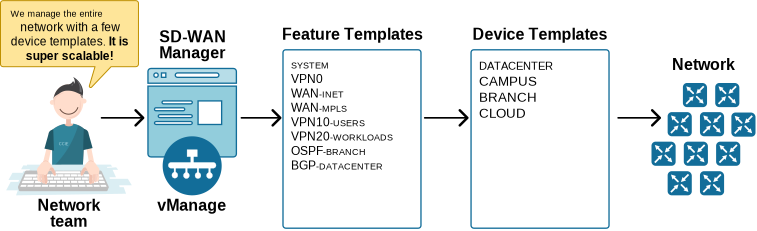
When you first start working with Device Templates, it feels very scalable. The design usually looks very simple. You imagine creating only a few templates and attaching all devices in the network to them, as shown in the diagram below:
Unfortunately, real networks don’t work like that. Suppose you create a Device Template called BRANCH. It describes the standard configuration of every branch router. However, you discover that some branches have two Internet circuits while others have Internet and MPLS. You cannot describe such a difference in one device template using variables, so you create two more templates:
BRANCH-DUAL-INET
BRANCH-INET-MPLS
A few months later, some branches need LTE backup. Another group of sites needs OSPF toward the LAN, while the others use VRRP. Okay, you create a few more templates, as shown in the diagram below:
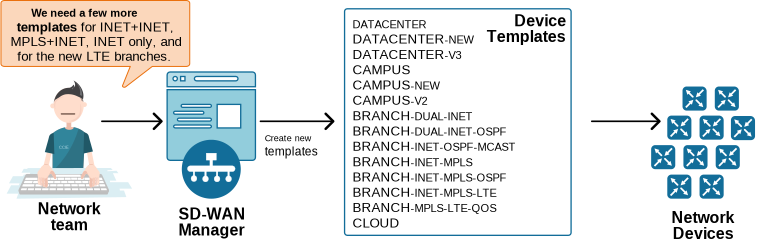
More and more templates continue to appear. Later, some sites require multicast. Others need a special BGP configuration. Another group uses different QoS settings. Before long, the clean design you started with may look like this:
BRANCH-DUAL-INET
BRANCH-DUAL-INET-OSPF
BRANCH-DUAL-INET-OSPF-MCAST
BRANCH-INET-MPLS
BRANCH-INET-MPLS-BGP
BRANCH-INET-MPLS-LTE
And those are the device templates for only one type of site and one type of hardware platform - for example, for Catalyst 8300 routers.
Hardware Dependency
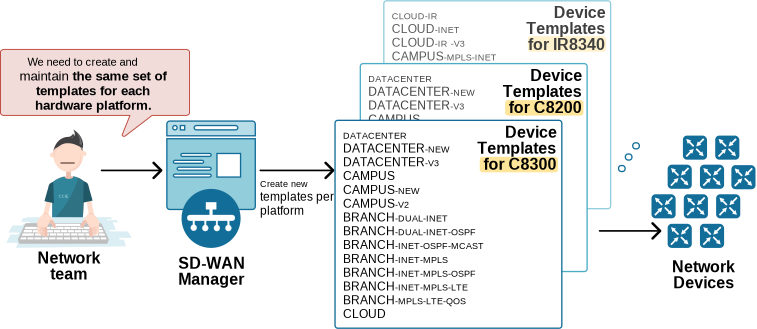
Another major limitation of Device Templates is that they are tied to a specific device model. For example, suppose your network contains branches with different platforms – for example, branches with C8200 routers, other branches with C8300, and others with industrial routers IR8340. Although the branch design may be exactly the same from a configuration point of view, you need to create separate groups of templates, as shown in the diagram below.
At this point, the number of device and feature templates has grown significantly. But this is not the end of the problems.
Another difficulty with Feature Templates becomes obvious only after you have worked with a large vManage environment for some time. Device templates are created from Feature Templates. You create many Feature Templates. Then you create more. Other administrators create their own templates. Factory-default templates are also present. After only a few months in production, the system may contain hundreds of feature templates with names such as:
BRANCH-VPN0
BRANCH-VPN0-V2
VPN0-BRANCH-V3
VPN0-BRANCH-NEW
VPN0-BRANCH-COPY
VPN0-BRANCH-V2-TEST
VPN0-PRODUCTION
VPN0-NEW-BRANCH
...
The template sprawl continues to grow.
The Blast Radius (Configuration and Deployment Coupling)
And there is my favorite problem. Another often-overlooked reason why template sprawl happens is the fear of a large blast radius. I’ve experienced it many times. Believe me, it is not a pleasant experience for a network engineer.
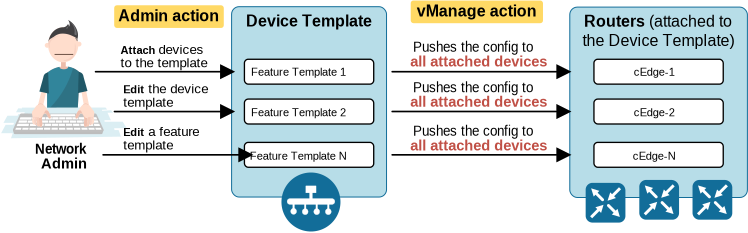
Recall that with Device and Feature Templates, any change you make requires you to push it to all attached devices, as shown in the diagram below.
Suppose 100+ routers are attached to the same Device Template. From a standardization and scaling point of view, this looks perfect, right? You have one template that defines the configuration of all branches. But now imagine that you need to change something in that template. That’s when your heart starts pounding in your chest, and your pulse goes up.
The change itself may be small, let’s say modifying a routing parameter. However, because hundreds of devices share the same template, the potential impact of that change is huge. Because of this, administrators sometimes deliberately copy/paste the same template into a new one with a different name and simply attach a smaller number of devices. Just to make the blast radius smaller.
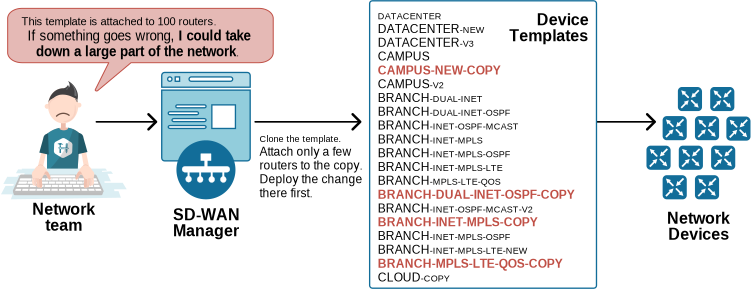
The routers may have almost identical configurations. From a pure configuration point of view, there may be no strong reason to separate them. The reason is operational. If something goes wrong after a template change, the administrator would rather affect 2 routers than 100.
In other words, engineers trade configuration simplicity for a smaller blast radius. The larger the template, the better the standardization. But the larger the template, the larger the potential blast radius of a change.
Order of deployment
And last but not least is the problem with deployment. A Device Template describes the desired configuration of target devices, but it does not describe the operational dependencies between devices. For example, two routers on a dual device branch may have almost identical configurations and belong to the same template, yet operationally they may need to be changed one at a time. Some changes such as routing, VRRP, Redistribution, TLOC Extension, etc., affect the relationship between the two routers and may require applying the change on router R1 first. Then, only after R1 converges, apply the change to router R2.
That creates another reason for engineers to split or clone device templates. And again, this can contribute to template sprawl. Instead of keeping several identical routers under one reusable configuration object, engineers may create smaller templates or copies simply to gain control over when and in what order devices are changed.
Findability
As a result of the inefficiencies we just saw, operating a large-scale network with Device and Feature templates becomes very complex. Eventually, someone asks a very simple question: "Where are the route summarization settings configured for that branch?"And suddenly the answer is not so simple at all. There are hundreds of templates with different names, prefixes, and suffixes.
You may first need to open the Device Template. Then identify which Feature Template is responsible for the feature. Then find that template in the Feature Template list. Then open it and locate the setting. After changing it, you may need to return to another page to see which Device Templates use it.
This constant movement between Device Templates and Feature Templates can become cumbersome. The problem is not that Feature Templates are technically difficult. The problem is findability. The administrator must know which object contains the feature and often must also know the object's name. This becomes harder and harder as the number of templates grows.
Configuration Groups (UX2.0)
Configuration Groups (CGs) are the second-generation configuration model for Cisco SD-WAN devices. They address the inefficiencies of Device and Feature Templates that we just saw.
New GUI interface, a better structure
The first obvious improvement is the brand-new web interface page for creating configurations located at Configuration > Configuration Groups. It is much more structured and easier to navigate, as shown in the diagram below. Pay special attention to the hierarchy.
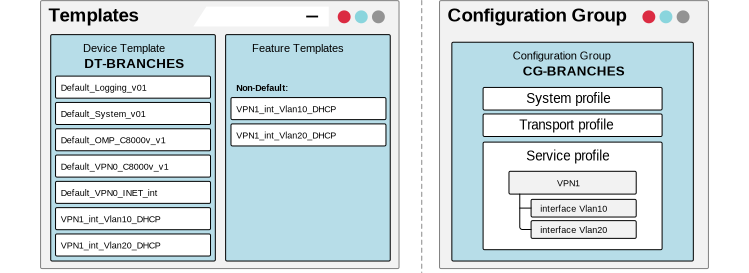
To understand the difference, consider the following example: you have a Configuration Group (CG) called Branches, and you need to change the configuration of interface Vlan10. You open the CG, navigate to the Service Profile, VPN1, and then open the VLAN interface feature. Everything is linked and presented within the same configuration group structure. You navigate through the configuration hierarchy until you reach the interface Vlan10 feature you want to change, as shown below.
Configuration Group Branches → Service Profile → VPN1 → Interface Vlan10On the other hand, if you have any prior experience with Device Templates, you know how you edit similar interface configurations. You know that VLAN 10 belongs to the Branches Device Template. However, the Device Template itself does not contain the actual interface settings. Instead, it references a Feature Template that contains them by name. But which feature template name exactly?
You can’t know on top of your head the name of the Feature Template that defines the configuration of Vlan10. So, what do you do? You first must open the Device Template and find out which Feature Template is attached to that interface. You then leave the Device Templates page, open the Feature Templates page, locate the exact template by name, and finally edit the configuration there.
Then, when you want to understand how that feature fits into the complete device configuration, you typically go back to the Device Template page again.
This constant jumping between Device Templates and Feature Templates is one of the main usability problems with the UX1.0 configuration model. The question is: Why should you need to know the name of a feature template just to change one setting?
With Configuration Groups, you do not. You navigate through the configuration hierarchy until you reach the feature you want to change. That is a huge operational simplification.
Feature Names
There is another related problem that becomes noticeable in large-scale deployments: Feature Template naming. All Feature Templates are stored together on the Feature Templates page. As a result, every Feature Template must have a unique name. In a small lab, this is not a big deal. In a production network with hundreds of default and custom templates, it certainly is.
Believe me, once the number of templates becomes large enough, coming up with a unique name that is also descriptive and easy to understand becomes a skill of its own.
Configuration Groups reduce this problem because features belong to the Configuration Group hierarchy rather than to one large global collection of Feature Templates. A feature name therefore needs to be unique only within the relevant Configuration Group. You can have a feature named OMP in CG-Branches and another feature named OMP in CG-CAMPUS.
Reusability (Platform-Agnostic)
This improvement doesn’t need any lengthy explanation. Configuration Groups and Feature Profiles are platform-agnostic. We can now associate devices of different hardware types to the same config group. This reduces the template sprawl significantly.
When deploying the configuration group to devices, vManage applies the features that each device supports. Therefore, not all devices must necessarily support all features.
Deploy Selectively
The last big improvement compared to UX1.0 is that the association and provisioning of devices are not bound to the deployment process, as you will see later in the workflow section.
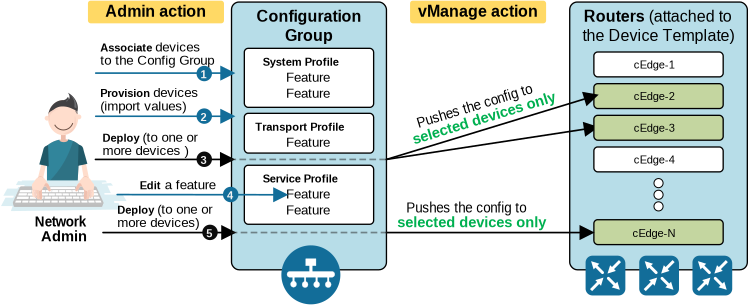
This is a big deal, but for now, let’s not dive into it because we will see it in action multiple times in the section.
What is a Configuration Group?
A Configuration Group, like a Device Template, is a construct that defines the full configuration for all IOS-XE routers that are associated with it. The main building blocks of a CG are as follows:

Digital Book Access
For now, the digital version of this book is available only to active subscribers and readers who own the second edition (2026) of the paperback (links at the bottom of the front page).
The ability to buy the digital copy directly is coming soon.
- Subscribers can access the full digital version as part of their membership.
- Paperback owners of the second edition (2026) can access the digital version using the instructions provided in the book.