JSON is everywhere in Network Automation and DevOps. If you capture a REST call going to Cisco DNA Center, Cisco Meraki, or IOS XE RESTCONF, you will see JSON flying by. It is the common language between DevOps and NetDevOps scripts, network devices, and controllers. In this lesson, you will learn what JSON is, why we use it, how it works, and how it compares to XML.
Why do we need JSON?
The first widely adopted plaintext data format was XML, as shown in the diagram below. We discussed in detail in the previous lessons of this section. It is very flexible, powerful, and relatively easy for humans to read.

However, as the Internet and Web grew, developers began to encounter new problems. The Web had to scale to millions of users, making millions of requests every minute. At that scale, XML began to show its weaknesses.
KEY POINT: Some problems only appear at a specific scale.
XML is quite wordy and a bit heavier for machines to parse. Every opening tag needs a closing tag, which adds a lot of extra characters, as you can see in the diagram below, which shows the same information formatted with XML and JSON.
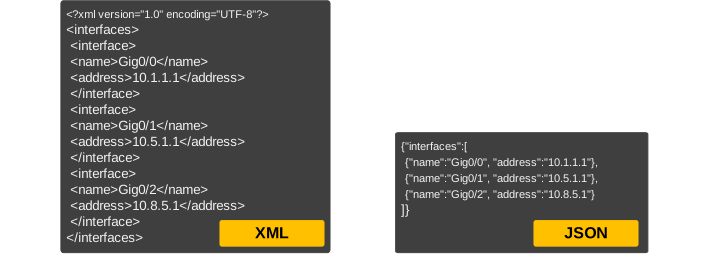
You may say: Okay, what difference may some additional characters make?
At a small scale, it's not a big deal. But when servers send responses to millions of clients, even a few extra kilobytes per request becomes very expensive in terms of bandwidth and processing time (which, at the bottom line, translates to MONEY).
Because of this, Web and API developers wanted a data format that was more efficient but still human-readable; they needed something that was easy for programs to parse and quick to generate from code. That is why JSON was created, and why modern web applications and APIs moved strongly toward using JSON.
What is JSON?
JSON stands for JavaScript Object Notation. Despite the name, JSON is not tied to JavaScript only. It is a simple text format for representing structured data. Humans can read it. Machines can parse it fast.
At some point in history, XML was the most popular choice for data exchange; however, with the rise of web applications and JavaScript, JSON emerged as the primary choice. You wonder why?
Because it maps better to the common data structures in programming languages: objects (or dictionaries), arrays (lists), strings, numbers, booleans, and null.
JSON (JavaScript Object Notation) is a minimal, human-readable format for structuring data. It is used primarily to transmit data between a server and a web application, as an alternative to XML.
JSON has several advantages:
- It is very compact
- It is easily readable for applications and people
- It is easily mapped into most programming languages' data structures
- All programming languages have libraries that can read and write JSON
- It is just plain text, thus it is easy to send and receive over the network and is language independent
How does JSON work?
At a high level, JSON is serialization. You take in-memory data structures and turn them into a standard text format. On the other side, the receiver deserializes the text back into in-memory objects. The key is that both sides agree on the shape of the data.
JSON vs XML
Nowadays, both JSON and XML are widely used. Let’s have a look at the differences between the two:
| JSON | XML |
|---|---|
| JSON has a more compact style as compared to XML. | XML is less readable compared to JSON and becomes hard to manage in large files. |
| JSON supports arrays. | XML doesn't support arrays. |
| JSON is more human-readable | XML is less human-readable. |
| JSON supports only text and number data types | XML support many data types including images, graphs, etc. |
Let's look at the following example to understand why JSON is more human-readable than XML:
XML Example:
<interfaces>
<interface>
<name>Gig0/0</name>
<address>10.1.1.1</address>
</interface>
<interface>
<name>Gig0/1</name>
<address>10.5.1.1</address>
</interface>
<interface>
<name>Gig0/2</name>
<address>10.8.5.1</address>
</interface>
</interfaces>
JSON Example:
{"interfaces":[
{"name":"Gig0/0", "add":"10.1.1.1"},
{"name":"Gig0/1", "add":"10.5.1.1"},
{"name":"Gig0/2", "add":"10.8.5.1"}
]}
What is JSON used for?
JSON is most widely used for sending and receiving data between web applications. Very common day-to-day usage of JSON is when a browser exchange data with a web server using a technology called AJAX.
In Networking, most platforms that have a programming interface API, accept and return HTTP messages that contain JavaScript Object Notation (JSON). Payloads to and from the API interface can be encapsulated through either XML or JSON encoding.