In one of the last lessons, we explained variables using the analogy of a warehouse. We learned that a variable is just a label, and that the label gets stuck onto a box sitting somewhere in the warehouse (in memory). The box holds the value. The box also has a data type. The label is just a reference to a box.
Now we need to ask a new question. Once a box exists, can we open it and change what's inside? Or do we always have to build a new box and move the label over? This is exactly what mutability is about.
What does mutability mean?
Mutability describes whether an object's value can change after it's created, without creating a brand-new object. If an object can be changed in place, we call it mutable. If it cannot, we call it immutable.
How do immutable data types work?
Immutable data types are objects whose contents cannot change after they’re created. In Python, the most common immutable types include:
- integer
- float
- bool
- string
To understand the concept, let's see an example of how immutable data types such as integers and strings work in the context of memory, and you will get the idea of what immutability means.
Creating a new variable
Consider the following Python code, which creates a new variable named mtu:
mtu = 1500What does the code do? It simply creates a new integer variable named mtu. However, what does Python really do in the background? It does a few things:
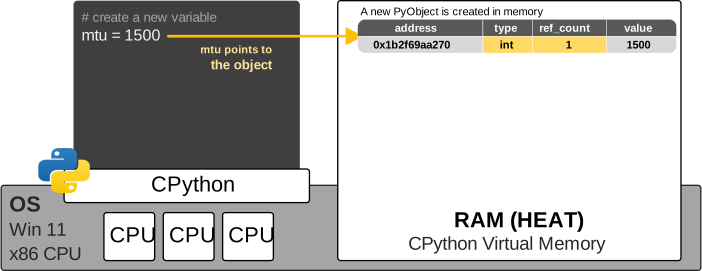
- It creates a new PyObject in RAM at memory address 0x1b2f69aa270.
- It dynamically determines that the value is an integer and makes the object type integer (because Python is dynamically typed).
- Because mtu now refers to the object, the object’s reference count reflects this reference and the ref_count is set to 1.
The diagram below shows mtu referring to an integer object representing 1500 at memory address 0x1b2f69aa270.
We can verify this using the following code:
mtu = 1500
print(type(mtu))  # <class 'int'>
print(hex(id(mtu)))  # 0x1b2f69aa270
Keep in mind that the memory address is only an example. The actual address can differ each time the program runs, and it will be different on your machine.
Reassigning mtu to a new integer
Now, let’s see what happens when we reassign the same variable name mtu to another value, as shown in the second line of the code block below.
mtu = 1500
mtu = 1474
Here is where the concept of immutability shows up, and many people get confused until they really understand the idea.
At first glance, the second line may appear to modify the existing integer object by changing its value from 1500 to 1474. However, this is not what Python does. Integer objects are immutable, so an existing integer object cannot be changed to represent another value.
What Python does can be described with the following simplified steps:
- Python creates a new PyObject in RAM at memory address 0x1b2f6c586b0.
- It changes the reference of the variable named mtu to point to this new object in memory. The new object now has a reference count of 1 (shown in yellow).
- The old object that holds the value 1500 now has a reference count of 0 (shown in red) because no variable currently points to it.
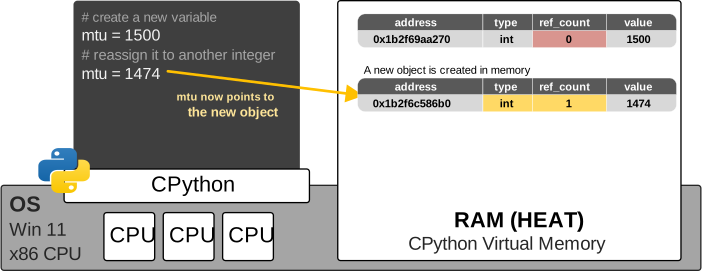
The key idea is that Python does not change the value inside the original integer object. Instead, it makes the name mtu refer to a different object. The object does not change. The name mtu changes which object it refers to.
Let's verify that this is the case using the following code:
mtu = 1500
print(type(mtu))  # <class 'int'>
print(hex(id(mtu)))  # 0x1b2f69aa270

mtu = 1474
print(type(mtu))  # <class 'int'>
print(hex(id(mtu)))  # 0x1b2f6c586b0
Reassigning mtu to a string
Let's not stop here. Let's reassign the variable named mtu to another value from a different data type, as shown in the third line of the code block below.
mtu = 1500
mtu = 1474
mtu = "too big"
At first, mtu refers to an integer object representing 1500. It then points to another integer object representing 1474. Finally, it points to a string object containing "too big".
In Python, we can describe the final reassignment with the following simplified steps:
- Python creates a new object in RAM at memory address 0x1b2f6c6f690.
- It dynamically determines that the object is an instance of the string type (because Python is a dynamically typed language).
- Python removes the existing binding between the name mtu and the integer object representing 1474. That object’s reference count decreases to 0.
- Python binds mtu to the string object containing the string "too big". This binding makes the reference count of the string object 1.
Notice that Python does not convert the existing integer object into a string object. Neither does it change the type of the variable itself. Instead, the name mtu simply refers to a different object in memory with a different data type, as shown in the diagram below.
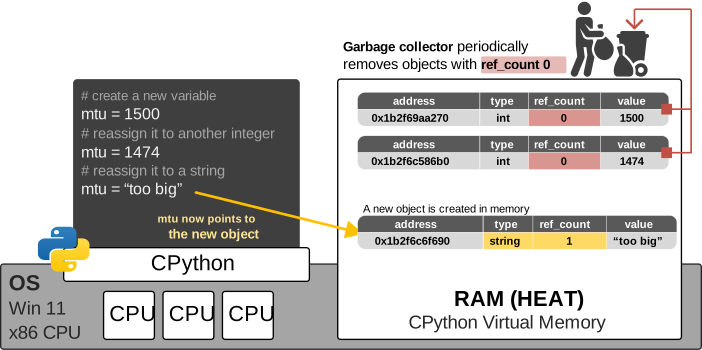
Notice what happens with the old objects in memory that now have a reference count of 0. Depending on the virtual machine implementation, Python either removes them from memory immediately, or a garbage collector that runs periodically finds and removes them.
KEY POINT: The variable mtu is simply a name. It is a name that can point to different objects. It has no data type. The data type and the variable value are part of the object in memory. When you reassign a different value to a variable name, you simply point the name to a different object.
That's the entire idea. Immutable objects are sealed for life. Let's verify this in practice:
mtu = 1500
print(type(mtu))  # <class 'int'>
print(hex(id(mtu)))  # 0x1b2f69aa270

mtu = 1474
print(type(mtu))  # <class 'int'>
print(hex(id(mtu)))  # 0x1b2f6c586b0

mtu = "too big"
print(type(mtu))  # <class 'str'>
print(hex(id(mtu)))  # 0x1b2f6c6f690
Multiple variables pointing to the same object
Now let’s examine another important aspect of Python variables: multiple variable names can refer to the same object in memory. Consider the following code:
mtu = "too big"
x = mtu
The first line creates the string object "too big" in memory and binds the variable name mtu to that object.
The second line does not create a new string object or copy the existing value. Instead, Python creates another variable name x and binds it to the same object already referenced by mtu, as shown in the diagram below.
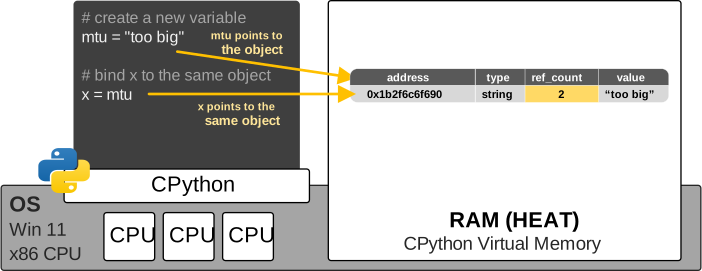
This is an important distinction. Python variables do not contain objects directly. A variable name acts as a reference to an object stored somewhere in memory. More than one variable name can reference that same object. We can verify this by using the built-in id() function:
mtu = "too big"
x = mtu

print(hex(id(mtu)))  # 0x1b2f6c6f690
print(hex(id(x)))  # 0x1b2f6c6f690
print(x is mtu)  # True
Notice the is operator confirms this: x is mtu. It returns True because both variables point to the exact same object in memory.
In this example, the shared object is a string. Strings are immutable, which means their contents cannot be changed after they are created. This makes sharing the same string object safe and usually invisible to the programmer.
However, the situation becomes more interesting when multiple variables point to a mutable object, such as a list. A change made through one variable may then be visible through the other variable as well. Let’s explore that behavior next.
How do mutable data types work?
Mutable data types are objects whose contents can change after they’re created. In Python, the most common mutable types include:
- list
- dictionary
- set
Notice the pattern? The simple, single-value types (numbers, text, true/false) are all immutable. The collection types that hold collections of things (lists, dictionaries, sets) are mutable.
A mutable object usually holds references to other immutable objects, rather than containing the value directly. To understand this concept, let's get into a few examples. Consider the following code:
hosts = ["R1", "R2", "R3"]At first, people assume that Python creates a new PyObject in memory and adds the list's value (all three strings) inside. Then, when we want to modify the list, Python modifies the object and its value. Well, this is not how Python works.
When we create a new list, Python actually creates a new object of type list. The object's value actually holds references to three separate string objects: "R1", "R2", and "R3", as shown with red arrows in the diagram below.
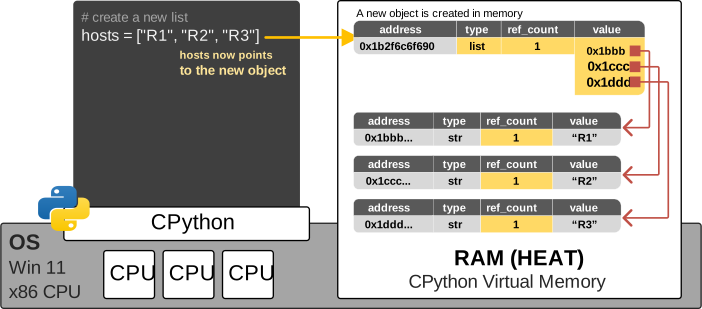
So conceptually, the structure looks like this:
hosts ──> list object
          ├──> "R1"
          ├──> "R2"
          └──> "R3"
Because the list is mutable, its references can be changed without replacing the list object itself. For example:
hosts.append("R4")This operation adds a reference to the "R4" string object to the existing list, as shown in the code block below:
hostnames ──> list object
              ├──> "R1"
              ├──> "R2"
              ├──> "R3"
              └──> "R4"
The strings are immutable, but the list containing references to them is mutable. In other words, Python does not modify the value of an existing string; it changes the collection of references held by the list.
This is the key idea to hold onto: mutability is a property of the container, not automatically a property of everything sitting inside it. A list can be mutable while every single item it references is immutable. The list gives you the flexibility to rearrange which objects it points to. It does not give the strings inside it the ability to change themselves.
Multiple variables pointing to the same mutable object
The behavior becomes especially important when multiple variable names point to the same mutable object. Consider the following code:
hosts = ["R1", "R2", "R3"]
routers = hosts
The first line creates a new list object and binds the variable name hosts to it.
The second line does not create a second list. It also does not copy the items from hosts into a new object. Instead, Python binds the new variable name routers to the same list object, as shown in the diagram below.
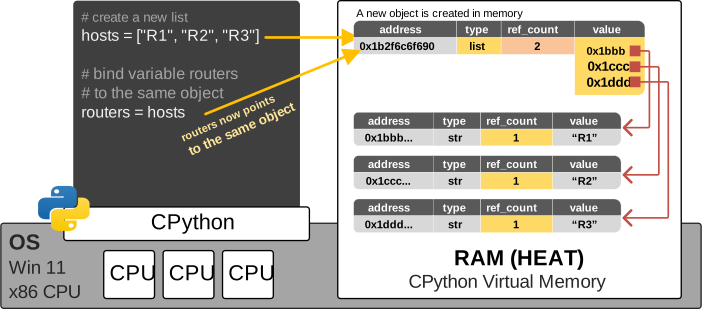
Both hosts and routers are references to the same mutable list, as you can see. But why does this matter?
It matters because lists are mutable. If the list is changed through one variable, the change is visible through the other variable as well. For example:
hosts = ["R1", "R2", "R3"]
routers = hosts

routers.append("R4")
print(routers) # ['R1', 'R2', 'R3', 'R4']
print(hosts)  # ['R1', 'R2', 'R3', 'R4']
We called .append() through the variable routers, but the new item also appears when we print hosts. This happens because Python did not create two separate lists. There is still only one list object. Both variable names point to it. After the .append() operation, the structure looks as shown in the diagram below:
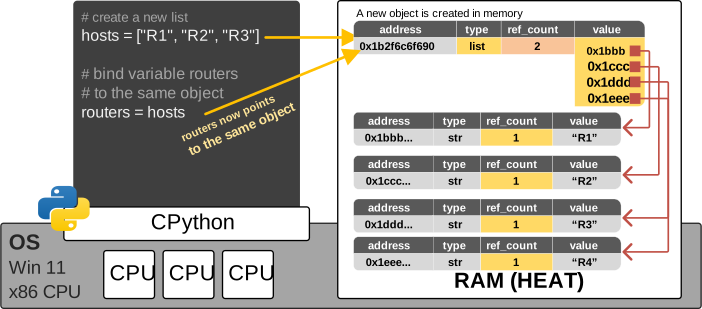
The variable routers did not modify hosts. Variables do not modify each other. Instead, routers was used to modify the shared list object, and hosts still points to that same object.
Why does Python do this distinction?
At first glance, mutability sounds like an unnecessary restriction. Why not let everything be editable?
Turns out, immutability buys you something valuable: safety and predictability, especially when the same object is shared by more than one variable. So the trade-off looks like this:
- Immutable types protect you from accidental side effects, at the cost of creating new objects every time a value changes.
- Mutable types let you build and update efficiently in place, at the cost of needing more care around shared references.
Neither choice is "better." Python gives you both because different problems call for different guarantees. Sound familiar? It's the same lesson we learned about compiled versus interpreted languages. Every design decision is a trade-off, and the right tool depends on what you're trying to protect.
Key Takeaways
The following diagram shows a summary of all Python data types in the context of mutability:
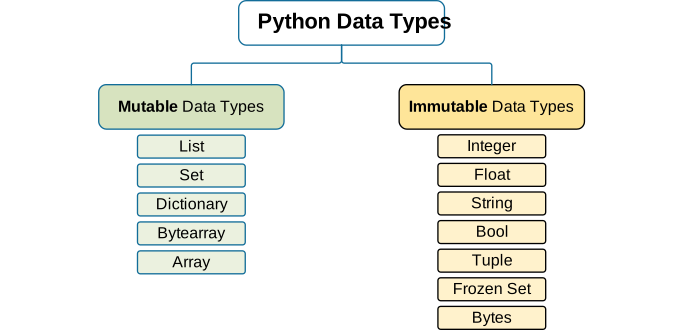
- Mutability describes whether an object's value can change in place, without creating a new object.
- Mutable objects (like list, dict, and set) have a "hinged lid." You can open them and change their contents while the object keeps the same identity and memory address.
- Immutable objects (like int, float, str, bool, and tuple) are "sealed boxes." Any apparent change actually creates a brand-new object, and the variable label gets moved to it.
- Immutability protects shared data from unexpected side effects. Mutability allows efficient, in-place updates, especially useful when building up data over a loop.
- A list is mutable as a container, but the individual objects it references (like strings or numbers) can still be immutable on their own.
- Reassigning an item inside a list (vlans[0] = ...) doesn't change the list's identity. It only changes which object that particular hook points to.