In this lesson, we continue our discussion of Python data types. We are going to discuss one of the most commonly used data types in network programmability and automation: lists. It is part of the sequence data types, as shown in the diagram below.
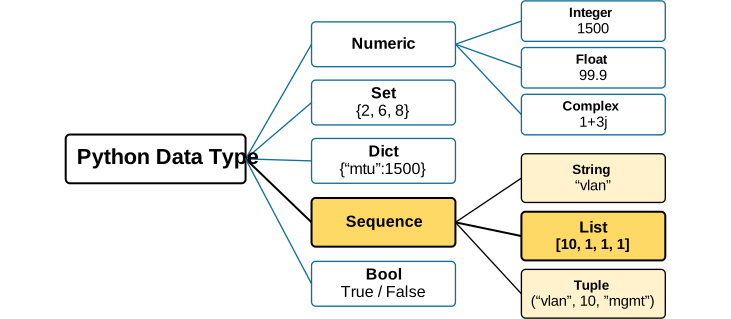
Since lists and strings are both sequence types, they have many features in common. If you are following the lessons in order, as we strongly recommend, compare each list feature with what you have already learned about strings.
Why do we need the list data type?
Imagine you just got handed a task: check the status of 50 devices using their management IP addresses. You already know two data types: string and integer. A string can hold one IP address written as text. But you have 50 devices. The brute force approach is to write 50 separate variables for each device, as shown below.
host_1= "10.1.1.1"
host_2= "10.1.1.2"
host_3= "10.1.1.3"
host_4= "10.1.1.4"
host_5= "10.1.1.5"
# ...and 45 more lines like this
Imagine that you have a custom function ping() that pings each device using its management address, and you want to test all 50 devices. How many lines of code would you need? Probably around 100 lines of code, as shown below.
# notice this code doesn't work.
# it's just an example.

host_1= "10.1.1.1"
ping(host_1)
host_2= "10.1.1.2"
ping(host_2)
host_3= "10.1.1.3"
ping(host_3)
host_4= "10.1.1.4"
ping(host_4)
host_5= "10.1.1.5"
ping(host_5)

# ...and 90 more lines like this
# for each host
Obviously this doesn't seem elegant, right? What if you need to add a hundred more devices? Would you add 200 more lines of code? That's not programmability. That's just brute-forcing your way with Python using extra steps. This is exactly the problem a list solves.
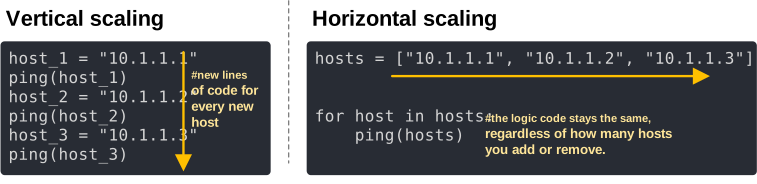
A list lets you store many values under a single variable and then iterate over them with a few lines of code. For example, one variable named hosts stores all devices' management IP addresses, as shown below.
hosts = ["10.1.1.1", "10.1.1.2", "10.1.1.3", "10.1.1.4", "10.1.1.5"]The code above creates one variable, hosts, with five management IP addresses. You can now create the logic to loop through it and do something. For example, you can ping each host, as shown below.
for host in hosts:
    ping(hosts)
Then you can add 45 more hosts later on, and the variable still works the same way. This is the whole point of the list. It decouples the logic from the number of items in the list. You can add or remove items without changing the logic code.
Basically, in a networking context, lists allow you to group similar values together into a single variable and scale your code horizontally, as shown in the diagram below.
What is a list in Python?
A list is an ordered sequence of values, written inside square brackets [ ], with each item separated by a comma, as shown below. The values inside a list are called items (or sometimes elements).
vlans = [10, 20, 30, 99]
hostnames = ["R1", "R2", "R3", "R4", "R5"]
mixed = ["R1", 10, "up", 8300]
Let's use the following diagram to introduce a few important aspects of lists right away, so we can use them as context later on.
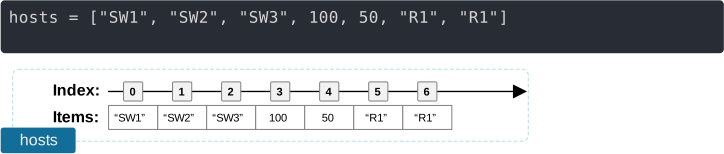
- Order matters. The first item stays first unless you move it yourself. For example, hosts[0] will always be "SW1" until you change it.
- A list can mix data types. Notice the list above holds items of different data types. It holds a string, an integer, and another string. This is typically not recommended, but Python allows it and can be handy in some scenarios.
- Duplicates are allowed. ["R1", "R1"] is a perfectly valid list, even though it holds duplicated values.
- Lists are mutable. You can add, remove, or change items after creating the list. Strings (another sequence type) don't let you do that. Once you write "R1", you can't change one letter in place. A list gives you that flexibility.
Notice that although Python lists can hold values of different data types, as shown in the example above, mixing them is usually not a good practice.
Now let's focus on the fact that a list is a sequence because this is its main feature.
How does a list work?
Since a list is a sequence of elements (also called items), we can access, add, remove, or change elements using their index number, as shown in the diagram below.
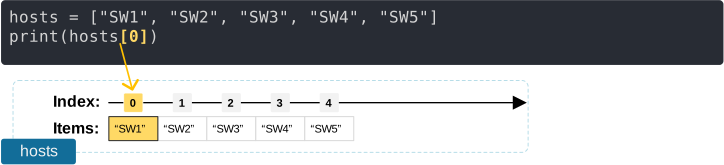
Almost all actions that we can do with lists are based on the index number of elements, as shown above.
Creating a list
Now let's begin with the basics: how do we create a list in Python? We do it by placing the values we want inside square brackets [ ], as shown below.
hostnames = ["R1", "R2", "SW1"]However, we can also create an empty list. An empty list contains no elements. It is often used when your program will add values later, as shown below.
# creating an empty list
devices = []

# adding values to the list
devices.append("R1")
devices.append("R2")
Accessing List Elements
Every item in a list has a position number, called an index. Remember that Python starts counting the indexes from 0, not 1.
Positive Indexes
You can access each element using its index number, as shown in the example below.
hosts = ["R1", "R2", "R3", "R4", "R5", "R6", "R7"]
print(hosts[3])  # prints R4
The following diagram visualizes what this code does. Python accesses the element with index number 3, which is the fourth item as shown below, and prints it in the terminal console.
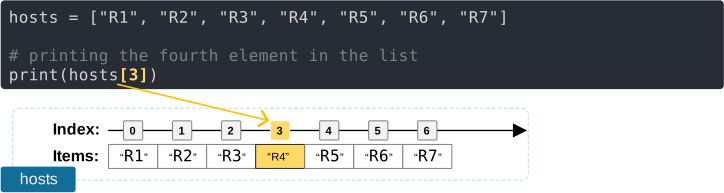
You can access any element using its index number.
Slicing a List
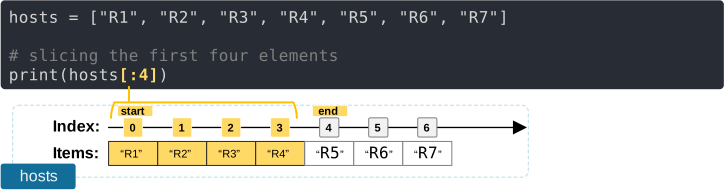
Sometimes you don't want one item. You want a chunk of the list. The slice [1:4] means "start at index 1, stop before index 4." That "stop before" part is a common trap that people fall into at first. Read means "up to, but not including." For example, the following code prints hosts[:4], which means "print all elements from the beginning up to index number 4, but not including 4", as shown below.
Negative Indexes
Sometimes, you want to start counting the index numbers from the end backward toward the beginning of the list. In that case, we can use negative indexes. In that case, -1 is the last index in the list. For example, printing hosts[-1] means "give me the last item," no matter how long the list is.
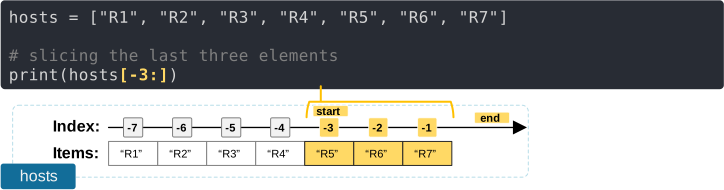
You'll use this approach constantly once you start pulling data from show commands where you don't always know the exact length of the list in advance.
Iterating Through a List
However, the biggest advantage of lists is that you can iterate through them with one line of code. We call this action a loop. Instead of writing one print() or one ping() call per device, you write it once and let Python repeat it for every item in the list. 50 devices, 3 devices, 1000 devices, the code doesn't change.
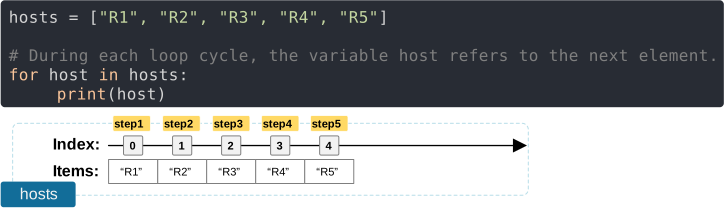
This code prints the following output in the terminal console.
R1
R2
R3
R4
R5
Let's zoom in on how this loop works. A Python for loop repeats a block of code for each item in a list (or another sequence such as a string or range). Consider the following code:
for host in hosts:
    # do something with the loop variable host
Notice that hosts is the list we want to iterate through. The variable host is the loop variable. It could be any arbitrary name you want. During each iteration of the for loop, Python assigns the loop variable to the next item from the hosts list, as shown in the diagram below.
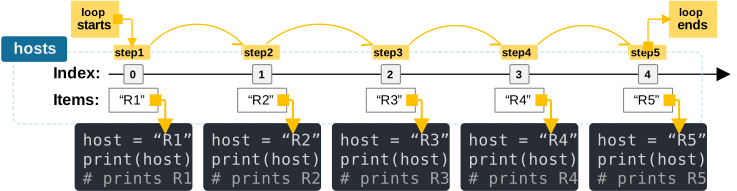
This is how the loop prints each host name, one at a time, with only two lines of code.
Lists are Mutable
By now, you must have seen the similarities between lists and strings. They are both sequences and share many features. However, the big difference is that strings are immutable while lists are mutable. We still haven't discussed mutability, but for now, let's say that lists are mutable, which means you can add, remove, or change their items after the list is created.
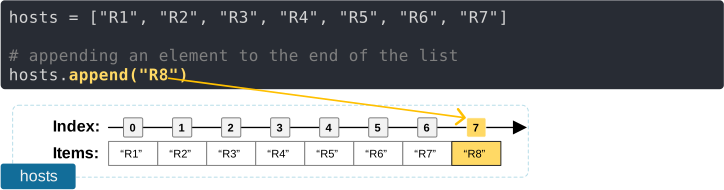
.append() - Adding an item to the end of a list
You can add an item to the end of a list using the append() method, as shown below.
.insert() - Inserting at a specific position
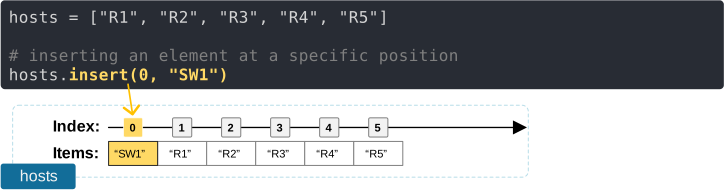
You can insert a value at a specific index position using the insert() method, as shown below.
.remove() - Removing a specific value
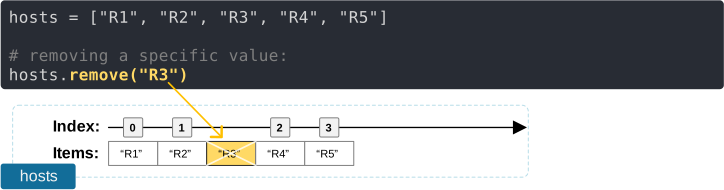
You can remove a value using the remove () method, as shown below.
Key Takeaways
A list is how Python holds more than one value under one variable, in a fixed order, and lets you change that collection over time. For a network engineer, that's the foundation for almost every automation task you'll run into: a list of devices to configure, a list of VLANs to check, a list of interfaces to monitor. Get comfortable with indexing, slicing, and looping now, because you'll use all three in nearly every script from here on.
Practice Yourself
Reading about Python lists only gets you so far. You cannot learn them without practice. Open a Python IDE or the interactive shell and work through these. They're all things you could realistically run into on the job.
You are given the following lists. Copy/paste them in your IDE and use them to complete the following tasks:
vlans = [10, 20, 20, 30, 999, 40]
status = ["up", "down", "up", "up", "down", "down"]
switch_stack = ["SW-01", "SW-02"]
hops = ["10.1.1.1", "10.1.2.1", "10.1.3.1", "192.168.1.1", "8.8.8.8"]
log = ["up", "up", "down", "up", "down", "down", "up", "up", "up", "down"]- First and last hop: You have a traceroute result stored as a list of IP addresses: hops. Using indexing, print only the first hop and the last hop, without typing out the actual IP addresses in your print() statements.
- The VLAN cleanup: A colleague left behind this list of VLANs: vlans. VLAN 999 was a testing one that never got cleaned up, and VLAN 20 is listed twice by mistake. Remove both the duplicate and VLAN 999. Printing the final list must show [10, 20, 30, 40].
- Who's still down? You pulled interface statuses into this list: status. Using the .count() method, figure out how many interfaces are down.
- The new switch stack: A new stack just showed up in the rack. You need to add three more switches to your existing inventory list switch_stack. Use the .append() method to add "SW-03", "SW-04", and "SW-05" one at a time. Print the final list.
- The flapping interface: You're troubleshooting a flapping interface and logged its status every minute for ten minutes in the list: log. Without counting by hand, use what you learned in this lesson to answer two questions in code: how many times was the interface up, and how many times was it down? Bonus: which state happened more often?
Take your time with these, especially number 5. If you get stuck, go back and reread the operations section. The goal isn't to memorize syntax. It's to start thinking in lists, because once this clicks, a huge chunk of network automation starts feeling like common sense instead of a foreign language.
Full Content Access is for Subscribed Users Only...
- Learn any CCNA, CCIE or Network Automation topic with animated explanation.
- We focus on simplicity. Networking tutorials and examples written in simple, understandable language.