In this lesson, we are going to discuss one of the most straightforward Python data types called an integer. The following diagram shows where it fits into the built-in Python data types we will discuss in this course.
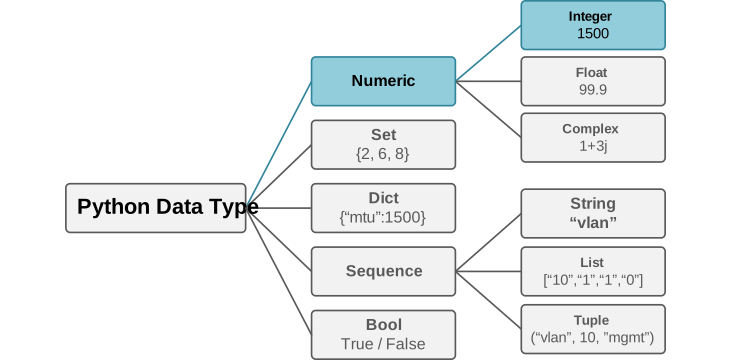
What is an integer?
An integer is a whole number without a decimal part. It is simply a positive or a negative number, or zero. Here are some valid Python integers:
device_count = 20
temperature = -5
packet_loss = 0
asn = 65001
All four values are integers. You can confirm their type with the built-in type() function:
device_count = 20
print(type(device_count))
Output:
<class 'int'>The output tells us that the value belongs to the int class. In Python, every value is an object. Therefore, an integer is also an object.
Common Integer Operations
Python supports all common mathematical operations on integers. I think we should not spend much time explaining them since all of us studied math in school. Just go through the following examples in the networking context and rerun them in your local environment just for the same basic experience.
Addition
Assume that a router has eight physical interfaces and four logical interfaces: Use the + operator to add values:
physical_interfaces = 8
logical_interfaces = 4
total_interfaces = physical_interfaces + logical_interfaces
print(total_interfaces)
Output:
12When it comes to addition, there is one use case which may not seem intuitive to network engineers at first. This is increasing a counter, as shown in the code block below:
successful_connections = 10
successful_connections = successful_connections + 1
print(successful_connections)
Output:
11Python also provides a shorter form:
successful_connections = 10
successful_connections += 1
print(successful_connections)
Output:
11The += operator adds a value and assigns the result back to the same variable.
Subtraction
Use the - operator to subtract one value from another:
total_devices = 25
offline_devices = 3
online_devices = total_devices - offline_devices
print(online_devices)
Output:
22You can also use the shorter assignment form:
available_ports = 48
available_ports -= 5
print(available_ports)
Output:
43Multiplication
Use the * operator to multiply values:
switches = 4
ports_per_switch = 48
total_ports = switches * ports_per_switch
print(total_ports)
Output:
192This operation is useful when estimating capacity. For example, imagine that each remote site has two routers:
sites = 15
routers_per_site = 2
total_routers = sites * routers_per_site
print(total_routers)
Output:
30Division
Python has two main division operators:
- / performs regular division.
- // performs floor division.
Regular Division
The / operator always returns a floating-point value:
total_ports = 48
groups = 4
ports_per_group = total_ports / groups
print(ports_per_group)
print(type(ports_per_group))
Output:
12.0
<class 'float'>
Even though 48 divides evenly by 4, the result is 12.0, not 12. This is an important Python rule:
Regular division always returns a float.
Floor Division
The // operator returns the whole-number result after rounding down:
total_ports = 50
groups = 4
ports_per_group = total_ports // groups
print(ports_per_group)
Output:
12Four groups can receive 12 complete ports each. Two ports remain unused. You can calculate the remaining ports with the modulo operator.
Modulo
The % operator returns the remainder after division:
total_ports = 50
groups = 4
remaining_ports = total_ports % groups
print(remaining_ports)
Output:
2Modulo is useful when you need to check whether one number can be divided evenly by another. For example, you can check whether a number is even:
device_id = 14
if device_id % 2 == 0:
   print("The device ID is even.")
You can also use modulo to alternate between two groups:
device_number = 7
group_number = device_number % 2
print(group_number)
Output:
1Exponentiation
Use the ** operator to raise a number to a power:
result = 2 ** 8
print(result)
Output:
256Powers of two are common in networking. For example, an IPv4 address contains 32 bits. If a subnet has a /24 prefix, eight bits remain for addresses:
prefix_length = 24
host_bits = 32 - prefix_length
total_addresses = 2 ** host_bits
print(total_addresses)
Output:
256This calculates the total number of addresses in the subnet. Be careful with the meaning of the result. Traditional IPv4 subnets usually reserve the network and broadcast addresses. However, /31 and /32 prefixes follow different rules.