In plain English, a string means a sequence of characters, which basically means text. But in network automation and in the networking world as a whole, the word text covers much more than normal words and sentences.
Almost everything you touch as a network engineer is text. A configuration, an IP address, a MAC address, an interface name, a VLAN name, a show command, etc. Everything. All of it is simply clear text, as you can see in the diagram below.
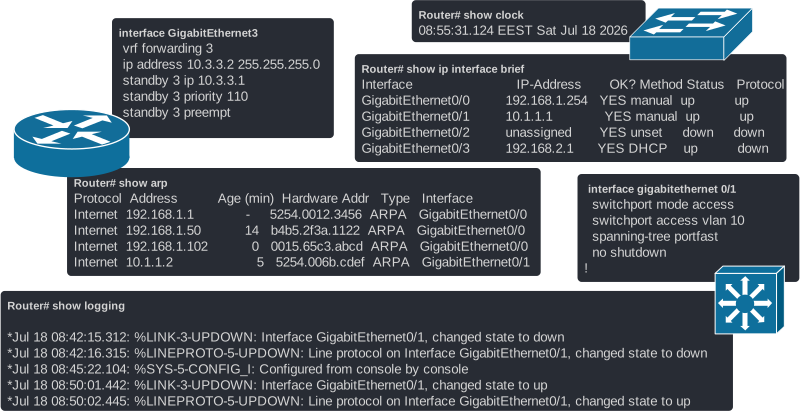
That's why it is super important to understand how strings work in Python and be very comfortable working with them in all kinds of scenarios. Let's dive in.
Strings in Python
String is undoubtedly the most common data type in Python. Why? Very simple. Because people fundamentally work best with text and always try to use text where possible.
What is a string in Python?
A string in Python is any sequence of characters enclosed within single (' ') or double (" ") quotation marks. Let's break down this statement in plain English.
Creating a string in Python means enclosing anything in single or double quotes, as shown in the diagram below. Python then treats whatever is inside the quotes as a string.
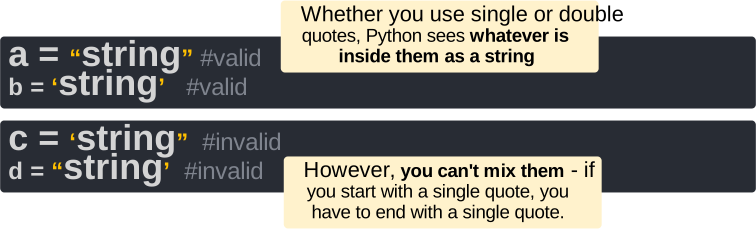
It is very important, from the very beginning, to think of a string as a sequence of characters, not as a single word, text, paragraph, or whatever. Consider the following variable interface, which is a string:
interface = "GigabitEthernet0/1"It contains letters, numbers, and slash characters. Python stores all of them as one ordered sequence, which looks like this:

Notice that this is an ordered sequence. The first character always starts at index number zero. The second at index number 1 and so on. As a side note, remember that in programming languages, everything starts at 0, not 1.
Let's look at one more example. Consider the following string variable ip_address:
ip_address = "192.168.100.254"It is an IP address, right? Yes, but Python does not know it is looking at an IP address. Because it is inside double quotes, it just sees a string: a sequence of characters sitting next to each other in a fixed order, as shown in the diagram below.

This matters more than it sounds. Because strings are ordered sequences of characters and you know the order, you can access individual or groups of characters using their index numbers. That is exactly what you will spend most of your network automation career doing: pulling an interface name out of a log message or a config line from the running config.
Working with strings
Now let's go through the most common operations that we can do with strings. It is important to test each of them in the Python interactive mode before we start with our practical projects.
Indexing
Because a string is a sequence of characters, every character has a fixed position, called an index. Therefore, we can access one or more individual characters using their index numbers, as shown in the example below.
interface = "GigabitEthernet0/0/1"
print(interface[0])
Result:
GThe following diagram visualizes what happens. The number in the square brackets is the index number you want to access. In our example, the interface[0] tells Python: print the character positioned at index number 0, which is the character "G".
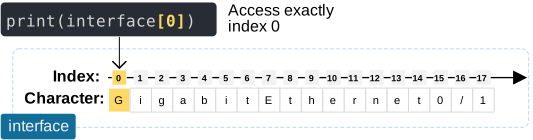
This can be useful in many scenarios. For example, you can check whether an interface is a GigabitEthernet type interface just by looking at its first letter.
interface = "GigabitEthernet0/0/1"
if interface[0] == "G":
   print("This is a Gigabit interface")
Result:
This is a Gigabit interfaceSlicing
Using the same logic, we can access multiple characters by their fixed order index numbers. For example:
interface = "GigabitEthernet0/0/1"
print(interface[0:7])
Result:
GigabitThe following diagram visualizes how the slicing works.
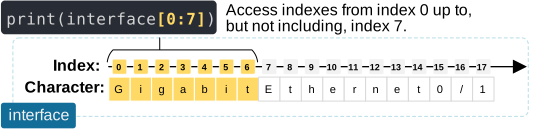
Notice that in slicing, the start index is included, but the end index is excluded. For example, slicing [0:7] selects elements at indices 0, 1, 2, 3, 4, 5, and 6 but not the element with index 7.
Slicing strings is super useful in many scenarios in network automation. For example, you can extract the OUI from a MAC address because we know the MAC structure is fixed, as shown in the code block below.
mac = "00:1A:2B:3C:4D:5E"
vendor_oui = mac[0:8]
print(vendor_oui)
Result:
00:1A:2BSlicing is more flexible than that. You can also leave out the start or end number index.
- Leaving out the start means "from the beginning."
- Leaving out the end means "all the way to the end."
Consider the following example:
interface = "GigabitEthernet0/0/1"
print(interface[:15])
print(interface[15:])
Result:
GigabitEthernet
0/0/1
The following diagram shows how you can select all characters from a string up to index number 15, but not including 15, as you can see below.
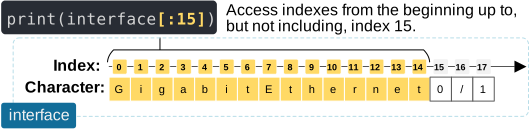
This can be useful in many situations where you want to check whether a string contains an exact word or sequence of characters at specific positions in the string.
You can also slice a string from a particular index up to the end, as shown in the diagram below.
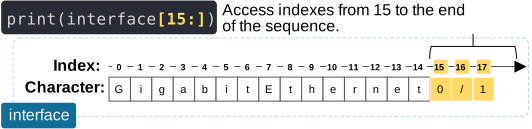
This is very useful when you don't know exactly where the string ends and how many elements there are.
Concatenation
Concatenation is another operation we can perform on strings. It just means sticking strings together. Since strings are ordered sequences of characters, with the + operator, you simply combine two sequences into one sequence. It is that simple. Consider the following example:
interface = "Gi0/0/1"
message = " is up"
print(interface + message)
Result:
Gi0/0/1 is upThe following example illustrates what happens when you concatenate two string variables. Notice that Python simply combines the two sequences of characters together into one sequence.
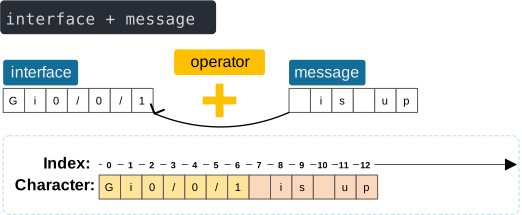
When talking about concatenation, keep in mind there is one catch, though. The + operator only works between strings OR between integers (which we discuss in the next lesson). If you try to concatenate a string with an integer, Python will raise an error, and your code will crash. For example, consider the following code:
print("vlan" + 10)Some people expect the result to be vlan10. But what actually happens is this:
>>> print("vlan" + 10)
Traceback (most recent call last):
TypeError: can only concatenate str (not "int") to str
The problem is that "vlan" is a string because it is enclosed in quotes. However, 10 is an integer because it is not enclosed in quotes (hence it is not a string).
This touches on another fundamental property of programming languages that we haven't discussed yet.
Weak vs. Strong Typed Languages
Programming languages differ in how strictly they handle values of different data types. Weakly typed languages like JavaScript often automatically convert two incompatible data types to the same type so they can execute the given operation. For example, when a string and a number are concatenated, JavaScript automatically converts the integer to a string.
On the other hand, strongly typed languages require explicit conversions between incompatible types.
Python is considered a strongly typed language because it does not automatically combine incompatible data types. Here, "vlan" is a string and 10 is an integer, so Python raises a TypeError:
You must explicitly convert the integer:
print("vlan" + str(10))Result:
vlan10Notice that Strong typing is separate from dynamic typing. Dynamic typing means that variable types are determined at runtime and variables can refer to values of different types. Python is therefore dynamically typed but strongly typed.
Length of a string
The len() function tells you how many characters are in a string. It is a general-purpose function that works with strings and other data types, which we will see later.
interface = "GigabitEthernet0/1"
print(len(interface))18The following diagram illustrates this concept.
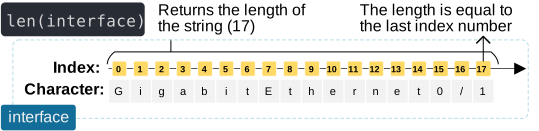
This is more useful than it looks. You can use it to validate input before you process it. For example, you can check the length of a MAC address (in string format, not in binary), as shown in the code block below.
mac = "00:1A:2B:3C:4D:5E"
if len(mac) == 17:
    print("Valid MAC address")
else:
    print("Invalid MAC address")
Finding Substrings
Another fundamental and super important operation we can perform on strings is to check whether a piece of text exists somewhere inside a string. For example, you pulled a bunch of syslog lines from a router, and you want to check whether an interface has gone down.
The in keyword checks whether a substring exists and returns True or False.
log = "GigabitEthernet0/0/1 changed state to down"
if "down" in log:
   print("Alert: interface went down")
Alert: interface went downThis one line is basically the foundation of a basic log-monitoring script.
Converting Uppercase / Lowercase
Now let's look at two very common methods we can use with strings. For now, let's not get into the details of what a method means, but simply focus on what we can use them for.
Once we assign a string variable, we can use the .upper() and .lower() methods to convert a string's case. This sounds cosmetic, but it solves a very real, very annoying problem: comparing text that should match but does not due to case differences.
interface = "GigabitEthernet0/0/1"
print(interface.lower())
print(interface.upper())
Result:
gigabitethernet0/0/1
GIGABITETHERNET0/0/1
When is this useful? Typically, when you compare two strings, it is always a good practice to lowercase(or uppercase) both sides. For example, consider the following example:
interface_1 = "GigabitEthernet0/0/1"
interface_2 = "gigabitEthernet0/0/1"
print(interface_1 == interface_2)
Result:
FalseThe strings look identical to your eyes, but they are not identical in Python because strings are case-sensitive.
Splitting into Lists
The last method that we are going to discuss is .split(). It breaks a string apart into a list, using a separator you choose. If you do not specify one, it splits on any whitespace by default.
Consider the following example:
ip_address = "192.168.1.1"
octets = ip_address.split(".")
print(octets)
Result:
['192', '168', '1', '1']Now you have each octet as a separate item you can work with individually. You can transform it to an integer or binary and do some math to calculate subnet masks and so on. We will use the .split() method a lot in our practical lessons later on.
Let's see another example with a different separator .split(":"). Let's break down a MAC address into different HEX parts.
mac = "00:1A:2B:3C:4D:5E"
mac_parts = mac.split(":")
print(mac_parts)
['00', '1A', '2B', '3C', '4D', '5E'].split() is probably the single most useful string method for a network engineer. Almost every piece of structured-looking network data (IP addresses, MAC addresses, routes, VLAN tables) is really just a string with a predictable separator that you can split apart.
Multiline Strings
Up until this point, you may be left with the impression that a string in Python is a single line of text. But what if you want to store a multi-line string into a variable? For example, an interface configuration or an entire device running configuration. You use three single or double quotes, as shown in the diagram below.
config = """interface GigabitEthernet1
description TRUNK
no shutdown"""
The important point here is that even though the text is written across multiple lines, Python stores it as one string that contains newline characters (\n), as you can see in the code block below.
config = "interface GigabitEthernet1\ndescription TRUNK\nno shutdown"There is no difference from Python's point of view whether you define strings on multiple lines or on a single line.