This lesson gives you a practical understanding of SSL/TLS certificates at the CCNA level. By the end, you should be able to explain why we need certificates, what they are, how they work, and how certificate authorities and root certificates fit into the picture.
Why do we need Certificates?
Let's imagine for a moment that SSL certificates do not exist as a concept and web browsers don't use certificates at all.
Now, suppose you are at a public place, like an airport, and connect your laptop to the Wi-Fi network. Your laptop receives an IP address, Subnet Mask, Default Gateway, and DNS addresses via DHCP, and you can access the Internet. You immediately open Google.com. How can you be sure that the page you see in your browser is really coming from Google? You can't.
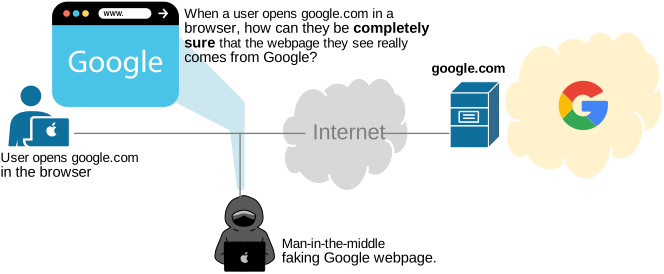
You don't own the network, you don't own the default gateway, nor the DNS server you were given. The DNS server could resolve google.com to a malicious IP address, and your browser might show you a fake copy of the Google website, as shown in the diagram above.
Whenever you open a website over a public network like the Internet, you can’t actually know, by default, if you’re seeing the real site or a fake copy. Someone along the path, like a rogue Wi-Fi hotspot, a compromised router, or a malicious DNS server, could redirect you to a look-alike page without you noticing.
This is exactly the problem that SSL/TLS certificates and the chain of trust were introduced to solve. They prove the identity of the server you connect to using a cryptographic key that your device can verify.
Some people assume that if we use HTTPS, the connection is encrypted, and that is enough. However, encryption and identity/trust are different things. If an attacker can trick you into connecting to their fake server, they can still build an encrypted connection with you and pretend to be the real site. This is a “man-in-the-middle” attack. You need both a chain of trust and encryption as follows:
- Certificates (chain of trust): prove “this really is Google”.
- Encryption: protect everything you send and receive so others can't read it.
What is Trust?
To understand the chain of trust, let's talk about trust in general. There are two main types of trust: direct and third-party trust, as shown in the diagram below.
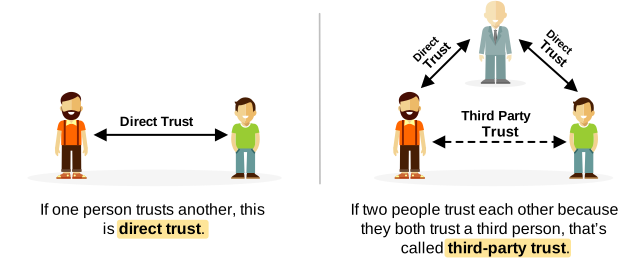
- Direct trust is when you trust someone because of your own experience with them. For example, you trust your friend because you’ve known him for years.
- Third-party trust is when you trust someone because a third person you already trust says so. For example, you don’t know Bob. But your best friend (whom you trust) says, “Bob is reliable, you can trust him.” So in the end, you trust Bob, even though you don't personally know him.
Because the Internet is enormous, with billions of devices, websites, and services, the direct trust model just doesn’t scale and isn’t practical.
That’s why, on the Internet, we use the third-party trust model. One entity (a device, website, or service) trusts another because both of them trust a third party called a Certificate Authority (CA), as shown in the diagram below.
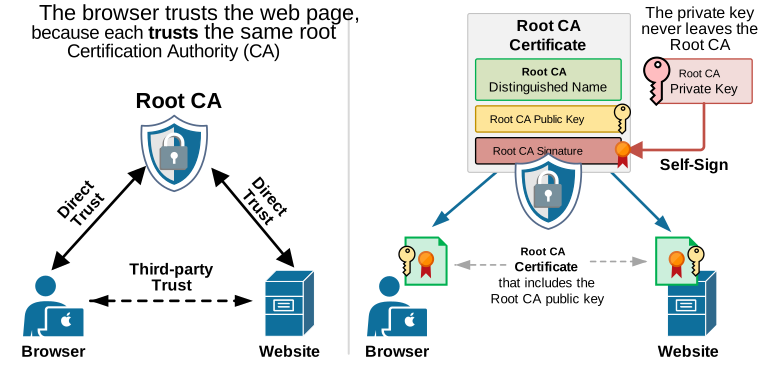
A browser knows which Certificate Authorities (CAs) it trusts because it has their root certificates installed, as shown on the right side of the diagram above. Each root certificate contains the CA’s public key. You’ll see later in the lesson why this public key is so important.
What is a Certificate Authority (Root CA)?
A Certificate Authority (CA) is a trusted third-party organization that issues digital certificates to verify the identities of websites and other entities on the internet.
To understand the concept, let's make an analogous example with the process of issuing passports by the Government, as shown in the diagram below.
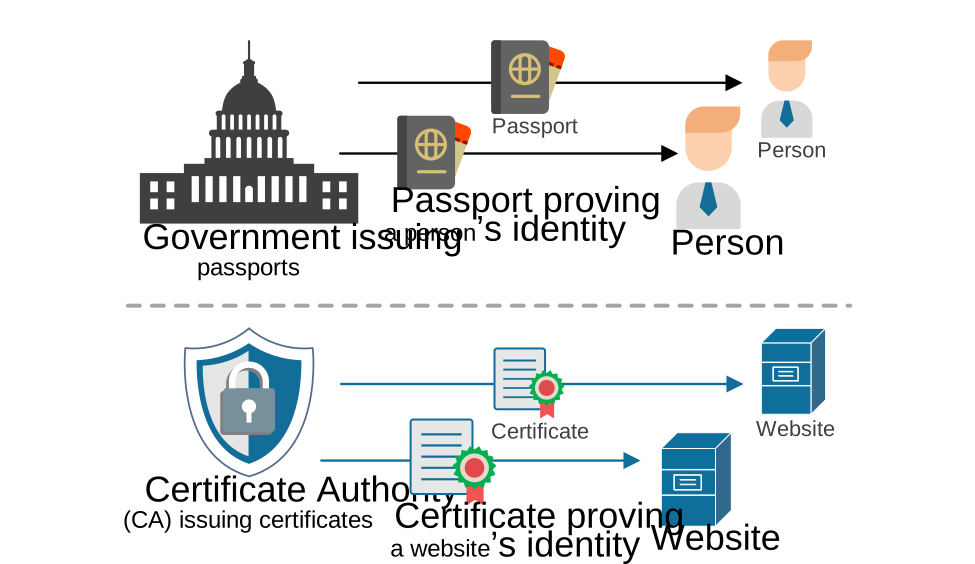
How do people prove who they are in real life? In most countries, a person applies for a passport. The government issues the passport, and then the person uses it to prove their identity to other institutions.
The same idea exists in the digital world. A website applies for an SSL certificate from a Certificate Authority (CA). The CA issues the certificate, and the website uses it to prove its identity to users and other systems.
SSL Certificate as a Passport
An SSL certificate, also called TLS or x.509 certificate, is very similar to a person’s passport. When a person needs to prove who they are, they show their passport. In the same way, when a website wants to prove its identity to a remote user, it sends its SSL certificate during the SSL/TLS handshake.
Now imagine you are at an airport in a country you are visiting for the first time. At border control, you show your passport to prove who you are. The officers can verify your identity if they recognize and trust your country’s passports and have the tools to check that your passport is genuine. If they do not trust your country’s passports or cannot verify them, your passport will not be accepted as proof of identity.
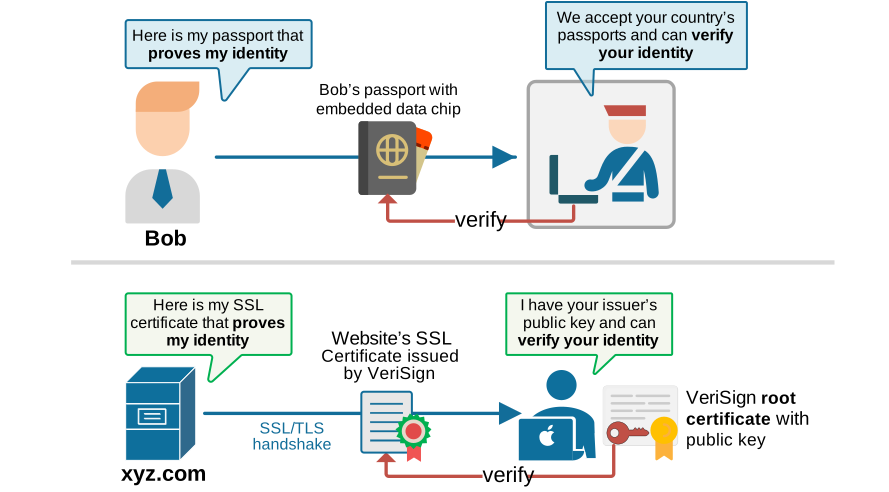
The same principle applies to SSL certificates. When a browser starts an SSL/TLS connection to a web server, the server presents its SSL certificate to prove its identity. If the browser trusts the Certificate Authority (CA) that issued the website’s certificate and has the CA’s public key, it can verify the certificate’s digital signature. If the verification is successful, the browser trusts the website (and you see the green lock in the toolbar). This idea is shown in the diagram above.
There is one more important point about SSL/TLS certificates. An SSL certificate is the last link in the chain of trust. It cannot be used to issue new certificates to others (similar to a passport, which cannot issue new passports...). Its only job is to represent the identity of that one client or device
How does the chain of trust work?
Now, let's zoom in and see how the chain of trust works and how everything fits together so that your browser knows whether a website is real or fake.
The root CA private key
Everything starts with the Certificate Authority's private key. It is a secret piece of data, as shown in the CLI block below, used in cryptography mathematics to "sign" other certificates.
-----BEGIN PRIVATE KEY-----
MIIEvQIBADANBgkqhkiG9w0BAQEFAASC
BgkqhkiG9w0BAasdsajKJKJHAa1121231
...
JKhdsahKHGG187675HKJHJKJLkdsklaa5
kJHG87sdhFJKS7812kjsdfh8ASDF9sdf=
-----END PRIVATE KEY-----
The private key is the most sensitive piece of information in the whole certificate system. If someone stole it, they could create fake certificates that every browser would trust. That's why CAs store their private keys locked in secure vaults in data centers with extremely strict physical and digital security measures, as shown in the diagram below.
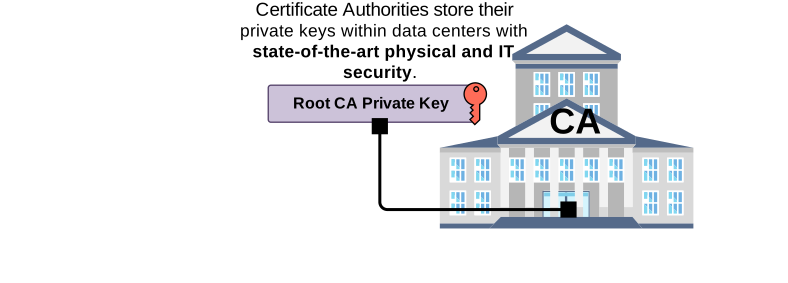
The private key never leaves the data center. All signing happens inside it, and if someone tries to break in or steal the key, the security system can shut down or even destroy the key. Many CAs also keep the root key completely offline. The key is powered on only during rare, controlled events called “signing ceremonies.”
What is a Certificate?
Next, let's introduce certificates. A certificate is a digital document that proves the identity of an entity (website, device, etc.) using a public key and a trusted signature. Nowadays, all certificates follow the X.509 standard. It describes what information must be inside a certificate, how the public key is stored, how identities are written, and how the certificate is signed. In general, simplified view, every certificate has two main parts, as shown in the diagram below:
- The first part holds all details about who issued the certificate, the validity period, and the certificate’s serial number, the website name, and its public key.
- The second part is the digital signature from the Certificate Authority. This signature proves that the certificate is authentic and has not been changed.
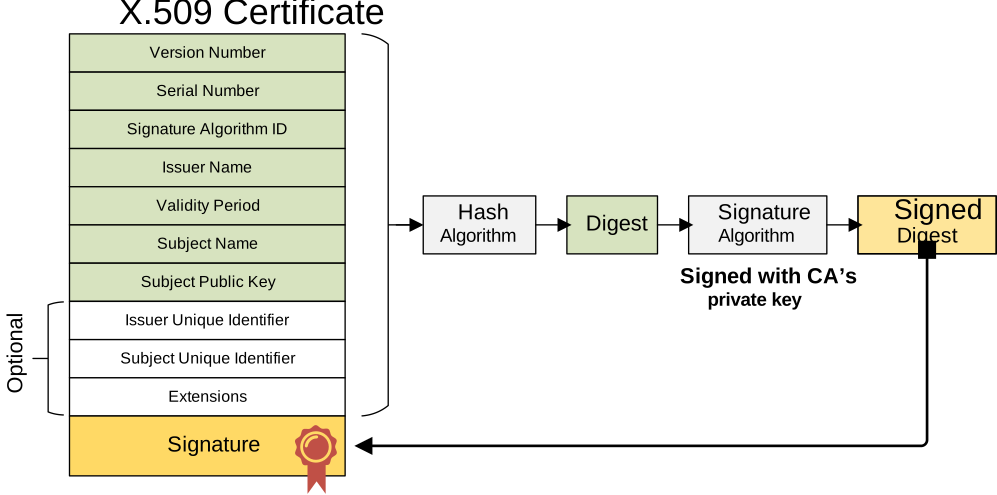
Notice how the certificate is signed. That signature is what proves it can be trusted. The Certificate Authority uses its private key to create this signature, just as we explained earlier in the lesson.
Many people wonder what exactly the "signature" is. When a CA signs a certificate, it takes the certificate's data (the “to-be-signed” part), runs it through a cryptographic hash function, and then encrypts the hash with its private key. The result is the digital signature. In short, the signature is the result of a cryptographic mathematical process that we don't need to know.
What is the Root Certificate?
Every Certificate Authority (CA) creates a certificate for itself and signs it with its own private key, as shown in the diagram below.
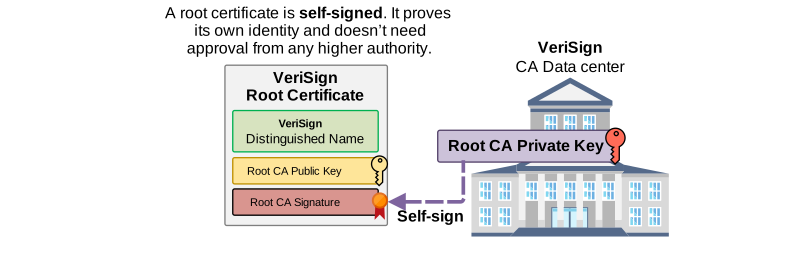
This is called the root certificate. It is the root in the chain of trust for all other certificates issued by that CA. To verify website certificates from this Certificate Authority, your operating system or browser must have the CA’s root certificate installed. But you don't remember installing any root certificate on your browser, right?
Distributing root certificates
Root CAs don’t send their root certificates to every device in the world one by one. Obviously, this cannot scale. Instead, the root certificates are pre-installed into the systems we already use.
Operating systems like Windows, macOS, iOS, Android, and Linux all come with a pre-installed list of trusted root certificates for the most popular CAs, as shown in the diagram below.
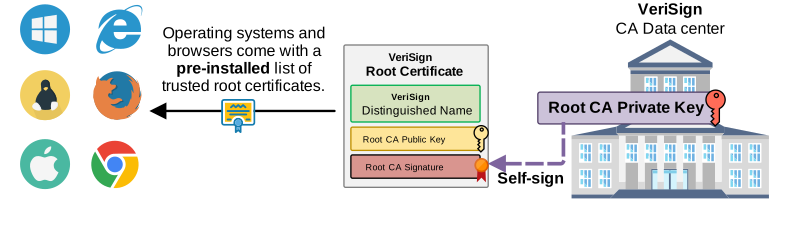
Web browsers and OSes keep their own trusted lists called root stores. Of course, a CA must undergo a lengthy approval process to have its root certificate included in these stores. The OS or browser company checks the CA’s security standards, audits, and policies before adding it. Once added, the root certificate is pushed to users through normal software updates. This way, every device automatically knows which root CAs to trust.
So in practice, you don’t download a root certificate from a CA’s website. Your device already has it, because your OS or browser installed it for you during an update. This is how the trust system scales to billions of devices without users needing to do anything manually.
A practical tip: open your browser’s settings, search for “certificate,” and find the “Manage certificates” section or something similar. There, you can easily find the root store and all root certificates that your browser has pre-installed.
Validating a certificate
Okay, now let's see what the root certificate's role is when you open a website like xyz.com in a browser like Chrome. The process of validating the website's identity is shown in the diagram below:
- Step 0: The browser initiates an HTTPS/TLS connection to the website.
- Step 1: During the TLS handshake, the website sends its SSL certificate issued by VeriSign.
- Step 2: The browser has the VeriSign root certificate pre-installed in its root store. It uses the public key from that root certificate to check and verify the signature on the website’s certificate.
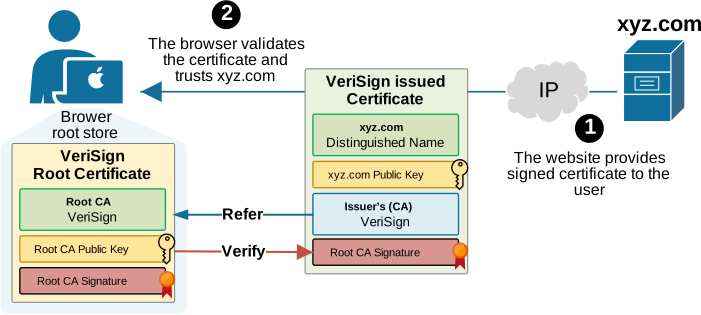
Using this process, the browser can be 100% sure that the website it sees is genuine and is not a fake man-in-the-middle copy.
Intermediate CAs
I intentionally left out one crucial part of the chain of trust earlier to simplify the chain of trust and make it easier to understand. However, in reality, there is an extra link in the chain called the intermediate CA.
Even though a root certificate is enough to build online trust, all well-known CAs use intermediate certificates. This adds an extra layer of security and makes the system easier to scale. You may wonder why?
We discussed earlier that CAs keep their private keys offline and in extremely secure vaults. But CAs need to issue millions of certificates every year. If the root key had to sign all of them, it would have to stay online nonstop and remain at constant risk. To avoid this, Certificate Authorities use intermediate CAs, as shown in the diagram below.
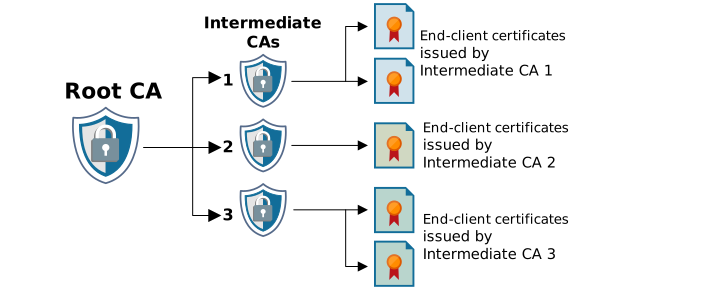
These intermediates CAs handle the everyday signing work, while the root key stays offline and protected. If a security incident happens, the CA can revoke only the compromised intermediate certificate instead of revoking the root certificate and every certificate signed by it.
Putting it all together
Now let's see how everything fits together. The Root CA hierarchy consists of more than one CA layer; the chain-of-trust changes, as shown in the diagram below. The websites now send their certificate signing requests (CSR) to an Intermediate CA, which signs them and issues the website certificate.
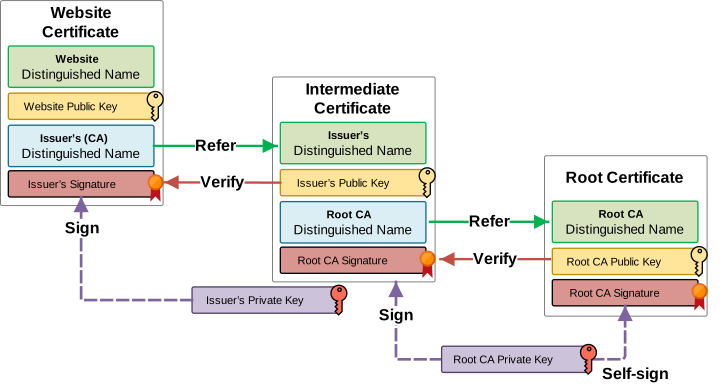
As you can see in the diagram above, a browser that receives a website certificate signed by an Intermediate CA needs to have both the Intermediate and Root certificates installed to verify the website certificate.
- Root certificates are stored directly in the device’s trusted root store. This store is part of the OS or the browser and contains only a small, carefully selected list of root CAs. These certificates are added through system updates or browser updates. They are installed once and rarely change.
- Intermediate certificates are handled differently. Devices usually do not ship with a complete list of intermediates. Instead, they learn them automatically. When your browser connects to a website, the server sends its certificate and the intermediate certificates that lead up to the root. The browser stores or caches these intermediates so it can use them later, even if another site uses the same intermediate.
So the flow is simple. The OS or browser includes the trusted roots. The website provides the intermediates during the TLS handshake. The browser plugs the intermediates into the chain and checks that everything traces back to a trusted root.
SSL/TLS Certificates in Networking
SSL/TLS certificates are widely used in modern networking. They help network devices trust each other without relying on passwords. A device presents its certificate, and the other side verifies it through the chain of trust, proving the device is genuine. This trust is then used to build secure tunnels in technologies like IPsec, SSL VPN, and SD-WAN. Once the identity is confirmed, the devices can create encrypted channels and exchange data safely, as shown in the diagram below.
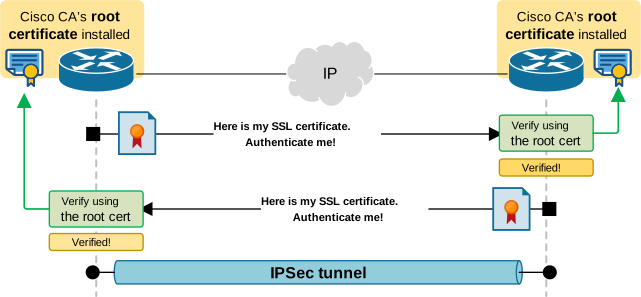
There are numerous examples of when SSL/TLS can be used, but for now, it is more important to understand and remember why we need certificates, what they are, and how they work, rather than going into real-world examples.
Key Takeaways
Undoubtedly, understanding certificates and all their technicalities is challenging. Well, I hope not anymore!
- Certificates solve the “fake website/man-in-the-middle” problem by proving server identity.
- The Internet uses third-party trust, where both sides trust a Certificate Authority (CA).
- All modern certificates follow the X.509 standard and share a similar internal structure.
- The CA creates a digital signature over the certificate data using its private key.
- A root certificate is the top of the chain of trust and is self-signed by the CA.
- Root certificates are pre-installed in the OS and browser root stores and distributed via updates.
- Browsers validate a site by checking the certificate’s signature back to a trusted root.
- Intermediate CAs sit between the root CA and end-entity certificates to add security and scalability.
- Root CA's private key stays offline and protected; intermediate CAs do the day-to-day signing work.
- If an intermediate is compromised, only that intermediate and its child certs must be revoked, not the root.
- In networking, certificates let devices mutually authenticate and build secure tunnels (IPsec, SSL VPN, SD-WAN).